
The best computers, tablets & components in this roundup are mostly portable tablet PCs, so I ranked them by how well they replace or support a laptop for real work, school, travel, and everyday use. My best overall pick is the Microsoft Surface Pro 2024 13-inch Copilot+ PC because it offers the strongest mix of premium hardware, long-term relevance, and laptop-style flexibility. The Lenovo Idea Tab Pro stands out for students who want a large 3K display with pen support, while the Fusion5 10.1-inch Rugged Windows 11 Pro Tablet is better for field work and durability. The biggest tradeoffs are Windows versus Android, premium performance versus bundle value, and slim design versus rugged protection. Keep reading for the full breakdown of which model fits which buyer.

Get business pricing on tools and workshop supplies
- Business-only prices and quantity discounts
- Tax-exempt purchasing
- Multiple users, one account, clear invoices
Key Takeaways
- Microsoft dominates the premium end: the Surface Pro 2024 ranks first because it is the most capable laptop replacement here, while the renewed Surface Pro 7+ is a smarter budget route into the same general format.
- Lenovo owns the student-friendly middle: the Idea Tab Pro is better for larger-screen note-taking and media, while the Idea Tab 11-inch is the lighter, lower-cost college pick.
- Fusion5 is the Windows value alternative: the Helios 12 favors display size and storage, while the rugged 10.1-inch model trades polish for protection, warranty coverage, and job-site practicality.
- Android bundles look generous on paper, but buyers should weigh app support, update confidence, keyboard quality, and brand ecosystem before choosing them over a Surface or Lenovo tablet.
- Specs alone do not decide the ranking: software platform, accessory quality, build, screen usefulness, storage type, and buyer fit mattered more than big RAM numbers in budget Android listings.
| 10.1″ Windows 11 Tablet with 6GB RAM, 128GB Storage, Intel Processor, 6000 mAh Battery |  | Best Budget Windows Tablet | Screen Size: 10.1 inches | Operating System: Windows 11 Home | RAM: 6GB | VIEW LATEST PRICE | See Our Full Breakdown |
| TABWEE T90 11-Inch Android 16 Tablet with Gemini AI 3.5, 24GB RAM, 8000mAh Battery | 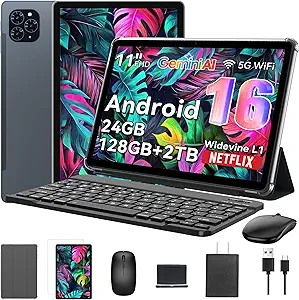 | Best Android Productivity Bundle | Operating System: Android 16 | Display: 11-inch FHD IPS | Resolution: 1920 x 1200 | VIEW LATEST PRICE | See Our Full Breakdown |
| Microsoft Surface Pro 7+ 12.3″ Tablet 2-in-1 (Renewed) |  | Best Renewed Windows 2-in-1 | Screen Size: 12.3 inches | Resolution: 2736 x 1824 | Processor: Intel Core i7-1165G7 | VIEW LATEST PRICE | See Our Full Breakdown |
| Microsoft Surface Pro 2024 13″ Copilot+ PC |  | Best Premium AI 2-in-1 | Display Size: 13 inches | Processor: Snapdragon X Plus, 10-core | AI Hardware: NPU for Copilot+ PC features | VIEW LATEST PRICE | See Our Full Breakdown |
| TABWEE T20 Android 16 Tablet with 24GB RAM, 256GB ROM (Expandable to 2TB), Octa-Core Processor and Gemini AI |  | Best Storage-Forward Android Kit | Operating System: Android 16 | Display: 10-inch HD Incell | Resolution: 1280 x 800 | VIEW LATEST PRICE | See Our Full Breakdown |
| Fusion5 10.1-inch Windows 11 Professional Rugged Tablet PC |  | Best Rugged Windows Tablet | Operating System: Windows 11 Professional | CPU: Intel 13th Gen N100 | RAM: 12GB | VIEW LATEST PRICE | See Our Full Breakdown |
| Jeazans Android 16 Tablet 2-in-1 Bundle with Keyboard, Mouse, Stylus and Case |  | Best Ready-to-Work Bundle | Model Number: Jzpad-KB10L | Operating System: Android 16 | RAM: 24GB listed, 3GB plus 21GB virtual | VIEW LATEST PRICE | See Our Full Breakdown |
| Lenovo Idea Tab Pro Student Tablet with Google Gemini |  | Best Student Media Tablet | Display Size: 12.7 inches | Resolution: 3K LCD | Processor: MediaTek Dimensity 8300 | VIEW LATEST PRICE | See Our Full Breakdown |
| Fusion5 Helios 12 Windows 11 Tablet PC | 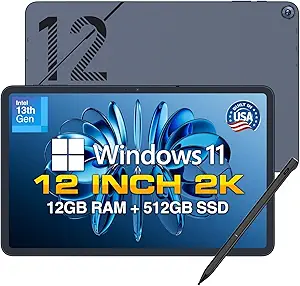 | Best Premium Windows Tablet PC | Operating System: Windows 11 Home pre-installed | Display: 12-inch 2K touchscreen, 2000 x 1200 | CPU: Intel 13th Gen quad-core | VIEW LATEST PRICE | See Our Full Breakdown |
| Lenovo Idea Tab 11-inch College Tablet with 2.5K IPS Display |  | Best Everyday College Tablet | Screen Size: 11 inches | Display: 2.5K IPS touchscreen, 90Hz | Processor: MediaTek Dimensity 6300 | VIEW LATEST PRICE | See Our Full Breakdown |
More Details on Our Top Picks
10.1″ Windows 11 Tablet with 6GB RAM, 128GB Storage, Intel Processor, 6000 mAh Battery
I rank this as the budget Windows pick because it gives buyers a familiar desktop-style OS, USB 3.0, and Micro HDMI in a portable 10.1-inch format. Compared with the Microsoft Surface Pro 7+, it is less powerful and less polished, but it also fits buyers who mainly need email, browser work, streaming, and light document editing rather than laptop-class speed. The 6GB RAM and 128GB storage are enough for basic Windows use, yet heavy multitasking will expose its limits faster than the Surface models. I also like that it has a long quoted battery range, but the plastic shell makes it feel more practical than premium. This is the sensible low-cost Windows choice, not the performance leader.
Pros:- Runs Windows 11 Home for familiar desktop-style apps
- USB 3.0 and Micro HDMI make it more flexible than many low-cost tablets
- 128GB storage is workable for basic files and apps
- Portable 10.1-inch size suits travel, school bags, and shared family use
Cons:- 6GB RAM can slow down under heavier Windows multitasking
- Plastic shell feels less premium than Surface-style metal designs
- Expandable storage is limited to another 128GB via microSD
Best for: Budget-focused buyers who want a small Windows tablet for light office work, web use, video calls, and media playback.
Not ideal for: Power users running many Windows apps at once, since 6GB RAM and a basic Intel processor can feel limited.
- Screen Size:10.1 inches
- Operating System:Windows 11 Home
- RAM:6GB
- Storage:128GB, expandable to 128GB via microSD
- Processor:Intel processor
- Battery:6000 mAh, up to 12 hours
- Connectivity:Wi-Fi, Bluetooth 5.0
- Ports:USB 3.0, Micro HDMI
Bottom line: Choose this if you want the most affordable Windows tablet in this group and can live with entry-level speed.
TABWEE T90 11-Inch Android 16 Tablet with Gemini AI 3.5, 24GB RAM, 8000mAh Battery
The TABWEE T90 earns its spot as my Android productivity bundle because it includes the keyboard, mouse, and stylus that the Microsoft Surface Pro 2024 asks buyers to add separately. Its 11-inch FHD IPS screen is sharper than the TABWEE T20, so reading, streaming, and split-screen study work should feel cleaner. The 24GB memory figure includes virtual RAM, so I would treat it as multitasking support rather than proof of workstation power; the Unisoc T615 is still the ceiling for demanding apps. The 8000mAh battery is a real advantage over the T20’s 5000mAh pack, especially for classes or long travel days. Its tradeoff is clear: generous accessories and battery life, but not premium-chip performance.
Pros:- Includes keyboard, mouse, and stylus for laptop-like use out of the box
- 11-inch 1920 x 1200 display is sharper than basic HD tablets
- 8000mAh battery supports longer study, work, and streaming sessions
- Expandable storage up to 2TB gives plenty of room for downloads and media
Cons:- Unisoc T615 may lag behind premium tablets in heavy creative or gaming workloads
- 24GB RAM relies partly on virtual memory, so it should not be read like full physical RAM
- Android app workflows may not replace Windows software for some work tasks
Best for: Students and remote workers who want an Android tablet that arrives with a keyboard, mouse, stylus, and long battery life.
Not ideal for: Buyers planning to edit large media files or play demanding games, since the Unisoc T615 is not a high-end chip.
- Operating System:Android 16
- Display:11-inch FHD IPS
- Resolution:1920 x 1200
- RAM:24GB, including 8GB built-in and 16GB virtual
- Storage:128GB ROM, expandable to 2TB via TF card
- Processor:Unisoc T615 octa-core
- Battery:8000mAh, up to 11 hours video playback
- Cameras:13MP rear, 5MP front
- Included Accessories:Keyboard, mouse, stylus
Bottom line: Pick the TABWEE T90 if accessories and battery life matter more to you than flagship processing power.
Microsoft Surface Pro 7+ 12.3″ Tablet 2-in-1 (Renewed)
I place the Microsoft Surface Pro 7+ above the basic Windows tablet for buyers who need real laptop behavior in a tablet body. Its Core i7-1165G7, 16GB RAM, and sharp 2736 x 1824 PixelSense display give it a much stronger productivity profile than the 10.1-inch Windows 11 tablet. Compared with the Microsoft Surface Pro 2024, though, this renewed model lacks the newer Snapdragon X Plus platform, larger storage, and Copilot+ positioning. That makes it a better value-minded Windows choice than a future-facing premium one. The 256GB SSD may also feel tight for creative libraries or large local projects. I would shortlist it for buyers who want Surface build and Windows Pro without paying new-device pricing.
Pros:- Intel Core i7 and 16GB RAM are strong for everyday Windows productivity
- 12.3-inch PixelSense display is much sharper than budget tablet screens
- Light 1.70-pound body keeps it easy to carry
- USB-C and USB-A support both newer and older accessories
Cons:- Renewed status may not appeal to buyers who prefer brand-new hardware
- 256GB SSD can fill quickly with large apps, media, or work files
- No built-in webcam is a real drawback for frequent video meetings
Best for: Windows users who want a lighter 2-in-1 for Office work, browser-heavy workflows, and portable productivity at a renewed-device price.
Not ideal for: Buyers who need new-device warranty certainty, large local storage, or the newest AI-focused Surface hardware.
- Screen Size:12.3 inches
- Resolution:2736 x 1824
- Processor:Intel Core i7-1165G7
- RAM:16GB
- Storage:256GB SSD
- Operating System:Windows 11 Pro
- Weight:1.70 lbs
- Ports:USB-C, USB-A, Surface Connect
- Connectivity:Wi-Fi 6, Bluetooth 5.0
Bottom line: The Surface Pro 7+ is the practical renewed Surface pick when Windows performance matters more than owning the newest model.
Microsoft Surface Pro 2024 13″ Copilot+ PC
The Microsoft Surface Pro 2024 is my premium pick because it pairs a modern Snapdragon X Plus platform with 16GB RAM, 512GB storage, and a larger 13-inch touchscreen. Compared with the Surface Pro 7+, it is the more forward-looking option for buyers who care about battery life, on-device AI features, and a current-generation 2-in-1. The tradeoff is cost creep: the detachable keyboard is sold separately, so the real laptop-style price climbs quickly. Some Copilot+ features also depend on software timing, which makes part of the pitch less immediate than the hardware itself. I would choose this over the TABWEE tablets for Windows-first productivity, but only if premium portability and long battery life justify the spend.
Pros:- Snapdragon X Plus chip and NPU support current AI-focused Windows features
- 13-inch touchscreen gives more room than smaller tablet displays
- 512GB storage is more comfortable than the Surface Pro 7+ configuration here
- Up to 14 hours of battery life suits travel and long workdays
Cons:- Keyboard is sold separately, increasing the full setup cost
- Some Copilot+ features may depend on later software availability
- Windows on Arm may require app compatibility checks for specialized software
Best for: Professionals and frequent travelers who want a premium Windows tablet with long battery life, AI-ready hardware, and a laptop-like setup.
Not ideal for: Budget buyers or anyone who needs a keyboard included in the box, since the detachable keyboard costs extra.
- Display Size:13 inches
- Processor:Snapdragon X Plus, 10-core
- AI Hardware:NPU for Copilot+ PC features
- RAM:16GB
- Storage:512GB
- Battery Life:Up to 14 hours
- Design:2-in-1 tablet with detachable keyboard support
- Keyboard:Sold separately
Bottom line: Buy the Surface Pro 2024 if you want the most premium, AI-ready 2-in-1 here and are prepared to pay for the full kit.
TABWEE T20 Android 16 Tablet with 24GB RAM, 256GB ROM (Expandable to 2TB), Octa-Core Processor and Gemini AI
The TABWEE T20 makes the list for buyers who want the most storage-friendly Android kit in this batch. Compared with the TABWEE T90, it doubles built-in storage to 256GB and still expands to 2TB, which matters for offline video, class files, PDFs, and app-heavy use. Its included keyboard, stylus, mouse, and screen protector also make it feel ready for study or light work without extra shopping. The compromise is the display: the 1280 x 800 HD panel is a step down from the T90’s 1920 x 1200 screen and far behind the Surface displays. Battery life is also shorter at up to 6 hours. I see it as the storage-first Android value pick, not the best screen or endurance choice.
Pros:- 256GB built-in storage is generous for this kind of Android tablet
- Expandable storage up to 2TB supports large offline libraries
- Keyboard, stylus, mouse, and screen protector are included
- Widevine L1 support enables 1080P streaming from supported services
Cons:- 1280 x 800 display looks dated beside FHD, 2.5K, and 3K alternatives
- Up to 6 hours of battery life trails the TABWEE T90 and Surface Pro 2024
- Keyboard bundle adds bulk when used as a travel tablet
Best for: Students or media-heavy Android users who store lots of files locally and want a full accessory bundle included.
Not ideal for: Buyers who prioritize a sharp display or all-day battery life, since the HD screen and 5000mAh battery are limiting.
- Operating System:Android 16
- Display:10-inch HD Incell
- Resolution:1280 x 800
- Processor:MediaTek T606 octa-core at 2 GHz
- RAM:24GB, including 8GB physical and 16GB virtual
- Storage:256GB ROM, expandable to 2TB via MicroSD
- Battery:5000mAh lithium polymer, 20Wh
- Cameras:8MP rear, 5MP AI front
- Included Accessories:Keyboard, stylus pen, mouse, anti-glare screen protector
Bottom line: Choose the TABWEE T20 when storage and included accessories matter more than screen sharpness or battery stamina.
Fusion5 10.1-inch Windows 11 Professional Rugged Tablet PC
I rank the Fusion5 10.1-inch Windows 11 Professional Rugged Tablet PC as the durability pick because it treats mobility like a job-site need, not a style choice. Compared with the Fusion5 Helios 12, it gives up the larger 2K screen and metal premium feel, but gains a shockproof, dustproof design and accidental damage coverage that make more sense for field forms, warehouse work, and travel-heavy Windows use. The 12GB RAM and 512GB SSD keep it well above basic Windows tablets, so it should feel less cramped than the lower-spec 10.1-inch Windows model in this roundup. The tradeoff is the compact display: 10.1 inches is fine for checklists and remote tools, less ideal for spreadsheets or side-by-side apps.
Pros:- Rugged, shockproof, dustproof build suits harsher working environments
- 12GB RAM and 512GB SSD give Windows 11 Pro useful breathing room
- Two-year warranty includes accidental damage coverage
- Covered ports, fast charging, dual-band WiFi, and Bluetooth 5.0 support mobile use
Cons:- 10.1-inch screen can feel tight for productivity apps
- MicroSD expansion is more limited than tablets with larger expansion ceilings
- Rugged casing may be less sleek for casual tablet buyers
Best for: Field workers, mobile technicians, and small business users who need a tough Windows tablet with real storage and warranty protection.
Not ideal for: Students or office users who mainly want a larger screen for writing, video, or split-window work.
- Operating System:Windows 11 Professional
- CPU:Intel 13th Gen N100
- RAM:12GB
- Storage:512GB SSD, expandable with MicroSD
- Display:10.1-inch Full HD IPS touchscreen
- Battery:6000mAh with fast charging
- Cameras:Dual Full HD cameras
- Warranty:2 years with accidental damage coverage
Bottom line: This is the Windows pick I would choose when durability matters more than having the biggest display.
Jeazans Android 16 Tablet 2-in-1 Bundle with Keyboard, Mouse, Stylus and Case
The Jeazans Android 16 Tablet 2-in-1 Bundle earns its place by bundling the pieces many buyers add later: keyboard, mouse, stylus, and case. Against the Lenovo Idea Tab 11-inch College Tablet, it looks more like a low-cost laptop stand-in out of the box, especially for note drafts, email, and web apps. I would treat the advertised 24GB RAM carefully because most of that is virtual memory, while the 64GB built-in storage is modest before using the 1TB expansion slot. Compared with the TABWEE T20, the accessory package is the bigger draw than raw storage. Its weak spots are clarity and polish: camera details are vague, and the Android tablet app experience may not replace a Windows machine for desktop software.
Pros:- Includes keyboard, mouse, stylus, and leather case for laptop-style use
- Expandable storage up to 1TB helps offset the small 64GB base capacity
- WiFi6 and Bluetooth 5.4 are strong connectivity specs for the price class
- Android 16 gives it a newer software platform than older budget tablets
Cons:- Most of the listed 24GB RAM appears to be virtual memory rather than physical RAM
- 64GB internal storage is tight for apps, downloads, and offline media
- Camera specifications are not detailed enough for buyers who care about video calls
Best for: Students and budget productivity buyers who want one box with a tablet, keyboard, mouse, stylus, and case.
Not ideal for: Buyers who need Windows desktop apps, clearly specified cameras, or large built-in storage without relying on a memory card.
- Model Number:Jzpad-KB10L
- Operating System:Android 16
- RAM:24GB listed, 3GB plus 21GB virtual
- Storage:64GB, expandable up to 1TB
- Display:10.1-inch touchscreen
- Processor:1.8 GHz processor listed as AMD
- Battery:19 watt-hours
- Connectivity:WiFi6 and Bluetooth 5.4
- Included Accessories:Keyboard, mouse, stylus, and leather case
Bottom line: This is the pick I would shortlist for a low-cost study or travel setup where included accessories matter most.
Lenovo Idea Tab Pro Student Tablet with Google Gemini
I place the Lenovo Idea Tab Pro above smaller student tablets when screen quality and reading comfort matter. Its 12.7-inch 3K LCD gives more room for PDFs, lecture notes, streaming, and sketching than the Lenovo Idea Tab 11-inch College Tablet, while the included pen and folio make it more complete than many bare Android slates. Compared with the Jeazans Android 16 Bundle, Lenovo’s advantage is the bigger, sharper display and quad JBL Dolby Atmos speakers, not a keyboard-heavy package. The MediaTek Dimensity 8300 should fit demanding study apps and casual gaming better than entry chips. The main limitation is storage: 128GB can fill quickly with downloads, games, and media, and the provided data does not list MicroSD expansion.
Pros:- Large 12.7-inch 3K display is better for textbooks, PDFs, and split-screen study
- Tab Pen Plus and folio case are included
- Quad JBL Dolby Atmos speakers strengthen video and class media use
- 45W fast charger and 11-hour streaming battery support long study days
Cons:- 128GB storage may feel limiting for media-heavy students
- No expandable storage option is listed in the provided product data
- Larger size is less pocketable than 10.1-inch and 11-inch alternatives
Best for: Students who read long documents, stream media, take pen notes, and want a larger Android tablet for campus work.
Not ideal for: Buyers who need a keyboard-first package or expandable storage clearly listed in the product data.
- Display Size:12.7 inches
- Resolution:3K LCD
- Processor:MediaTek Dimensity 8300
- RAM:8GB
- Storage:128GB
- Battery Life:11 hours of video streaming
- Charging:45W fast charger
- Audio:Quad JBL speakers with Dolby Atmos
- Included Accessories:Tab Pen Plus and folio case
Bottom line: This is the Android tablet I would pick for students who care more about display size and media quality than maximum storage.
Fusion5 Helios 12 Windows 11 Tablet PC
The Fusion5 Helios 12 is my premium Windows choice in this batch because it focuses on sustained computer-like work rather than simple tablet browsing. Compared with the Fusion5 10.1-inch Rugged Tablet PC, it trades job-site toughness for a larger 12-inch 2K touchscreen, DDR5 memory, more ports, and active cooling. That fan matters because Windows tablets can slow down during heavier workloads, and this design is better suited to long browser sessions, office apps, light creative work, and external display setups. The dual USB-C, USB 3.0, and Micro HDMI ports also make it more flexible than Android options like the Lenovo Idea Tab Pro. The drawback is portability and price: the metal body and premium hardware make less sense for buyers who only need notes, streaming, or simple student tasks.
Pros:- 12-inch 2K touchscreen gives more workspace than compact 10.1-inch Windows tablets
- 12GB DDR5 RAM and 512GB SSD support smoother Windows multitasking
- Active cooling helps performance hold up during longer workloads
- Strong port selection includes dual USB-C, USB 3.0, Micro HDMI, and headphone jack
Cons:- Likely heavier than simpler tablets because of metal construction and cooling hardware
- Higher-end design may be more than casual tablet users need
- Windows 11 Home lacks the Pro features found on the rugged Fusion5 model
Best for: Windows users who want a tablet PC for office apps, multitasking, stylus input, and more physical ports.
Not ideal for: Entry-level buyers, casual streamers, or anyone who values the lightest possible tablet over Windows flexibility.
- Operating System:Windows 11 Home pre-installed
- Display:12-inch 2K touchscreen, 2000 x 1200
- CPU:Intel 13th Gen quad-core
- RAM:12GB DDR5
- Storage:512GB SSD
- Battery:7.6V 4500mAh
- Charging:36W USB-C PD fast charging
- Ports:2 USB-C, USB 3.0, Micro HDMI, 3.5mm jack
- Build:Premium metal casing, assembled in Florida, USA
Bottom line: This is the Windows tablet I would choose when ports, cooling, and screen space matter more than rugged protection.
Lenovo Idea Tab 11-inch College Tablet with 2.5K IPS Display
The Lenovo Idea Tab 11-inch College Tablet sits in the sweet spot for students who want a sharper screen and longer battery life without moving up to the larger Idea Tab Pro. Compared with the Lenovo Idea Tab Pro, this model has a smaller 11-inch panel, but it doubles the listed storage to 256GB and stretches battery life to up to 12 hours for YouTube. That makes it easier to recommend for daily campus carry, note-taking, streaming, and web research. It also feels more polished than the Jeazans bundle if display quality is the priority, thanks to the 2.5K IPS 90Hz screen and low blue light certification. The compromises are clear: 90Hz trails faster tablets, and Android stylus tools may feel thinner than iPad or Surface ecosystems.
Pros:- 11-inch 2.5K IPS display balances portability with sharp text and media
- 256GB storage is roomier than the Lenovo Idea Tab Pro’s listed 128GB
- Up to 12 hours of YouTube battery life suits long school days
- Tab Pen and folio case are included for note-taking and protection
Cons:- 90Hz refresh rate trails modern 120Hz tablets
- Stylus app ecosystem is more limited than iPad or Surface options
- 20W charging is slower than the 45W charger listed with the Lenovo Idea Tab Pro
Best for: College students who want a portable Android tablet for notes, streaming, reading, and day-long battery life.
Not ideal for: Artists, stylus-first users, or buyers who want a 120Hz display and a mature pen app ecosystem.
- Screen Size:11 inches
- Display:2.5K IPS touchscreen, 90Hz
- Processor:MediaTek Dimensity 6300
- RAM:8GB
- Storage:256GB
- Battery Life:Up to 12 hours of YouTube
- Charging:20W fast charger
- Audio:Quad speakers with Dolby Atmos
- Included Accessories:Tab Pen and folio case
Bottom line: This is the student tablet I would pick for everyday carry when battery life, storage, and bundled basics matter most.

How We Picked
I ranked these picks around real buying decisions, not just spec-sheet size. A portable computer or tablet has to balance performance, software fit, screen quality, input options, battery expectations, storage, build quality, and value. Windows models scored higher when they could handle desktop apps and laptop-style workflows, while Android models moved up when they offered a strong display, included accessories, or a clear student and casual-use advantage. Premium picks also needed a reason to cost more beyond brand name, such as longer relevance, better accessory support, or a stronger productivity ecosystem.
The order reflects who gets the least compromise. The Surface Pro 2024 leads because it is the strongest all-around 2-in-1, while the Lenovo Idea Tab Pro and Fusion5 Windows tablets earn high positions by serving clear buyer groups at lower prices. Budget Android bundles sit lower because they can be useful, but their long-term software support, accessory feel, and app compatibility are less certain. I also separated similar models by role, so each recommendation has a clear reason to exist in the lineup.
Factors to Consider When Choosing Best Computers, Tablets & Components
Choosing among the best computers, tablets & components here starts with deciding what job the device must do most often. A tablet for streaming and notes can be simple, but a tablet meant to replace a laptop needs stronger software, better keyboard support, and enough storage for everyday files.
Choose Windows Or Android Before Comparing Specs
The biggest fork in this roundup is Windows versus Android. Windows tablets such as the Surface Pro models and Fusion5 Helios 12 are better when the buyer needs desktop apps, file management, external monitors, or workplace software. Android tablets such as the Lenovo Idea Tab Pro and TABWEE T20 are usually better for streaming, reading, note-taking, casual games, and lighter productivity. A common mistake is buying the cheaper Android bundle because it includes more accessories, then finding that a required Windows-only program will not run. I would start with software needs, then compare screen, storage, and price after that choice is clear.
Do Not Let Big RAM Claims Decide The Purchase
Several budget Android tablets advertise very large RAM numbers, but that does not automatically make them faster than a Surface or Lenovo with lower listed memory. Some Android listings combine physical RAM with virtual memory, which uses storage as backup and does not perform the same way as true system memory. Processor quality, storage speed, thermal design, and software tuning can matter more during multitasking. This is why the Microsoft Surface Pro 2024 and Lenovo Idea Tab Pro rank above some models with louder spec claims. Buyers comparing these devices should ask what the tablet can sustain during daily use, not only what number appears in the headline.
Match Screen Size To The Main Workflow
A larger screen is not always the better buy. The 13-inch Surface Pro 2024, 12.7-inch Lenovo Idea Tab Pro, and 12-inch Fusion5 Helios 12 are better for split-screen work, drawing, reading PDFs, and laptop-like setups. Smaller 10-inch and 11-inch models are easier to carry, easier to hold for long reading sessions, and usually cheaper. The tradeoff is that cramped multitasking can make a budget tablet feel slower even when the processor is acceptable. I would choose 12 inches or larger for productivity, and 10 to 11 inches for travel, casual use, or younger students.
Check Accessory Quality, Not Just What Is Included
Bundles with a keyboard, mouse, stylus, and case can look like better value than premium tablets that sell accessories separately. The catch is that included accessories may have weaker typing feel, less precise trackpads, basic stylus response, or bulky cases. A student typing papers every week may get more value from a better keyboard than from a bigger storage number. The Jeazans 2-in-1 bundle is useful for buyers who want everything in one box, while the Surface Pro route makes more sense when typing quality and accessory ecosystem matter. Treat accessories as part of the device, not as bonus extras.
Pay More For Durability Only When The Environment Demands It
Rugged tablets are not for everyone. The Fusion5 rugged Windows tablet earns its role because protection, accidental damage coverage, and field-ready design matter more for warehouses, inspections, workshops, or travel-heavy jobs. For a desk, classroom, or couch, that extra bulk can feel like a penalty rather than a benefit. Slimmer tablets such as the Lenovo Idea Tab 11-inch or Surface Pro 2024 are easier to carry and nicer to use casually. Pay for ruggedness when drops, dust, or shared-device handling are real risks.
Frequently Asked Questions
Should I Choose A Windows Tablet Or An Android Tablet From This List?
I would choose a Windows tablet if the device needs to run desktop apps, connect to office hardware, handle traditional file workflows, or replace a laptop. The Surface Pro 2024, Surface Pro 7+, and Fusion5 Windows tablets fit that role better than Android models. Android tablets make more sense for notes, streaming, reading, browser work, and lighter school use. The risk with Android is buying a strong-looking spec sheet and later discovering that a required app or workflow is missing. Start with the software, then pick the hardware around it.
Is The Microsoft Surface Pro 2024 Worth Paying More For?
The Microsoft Surface Pro 2024 is worth the higher price for buyers who want the closest thing to a premium laptop replacement in this group. It has the strongest overall role because it combines a refined 2-in-1 format, modern platform support, and a better long-term productivity path than budget tablets. Compared with the Surface Pro 7+ renewed, it is the better forward-looking buy, but the older model can be a smarter value if price matters more. Compared with Android tablets, it is much stronger for work software and multitasking. Skip it if the main use is streaming, casual browsing, or simple classroom notes.
Which Pick Makes The Most Sense For Students?
The Lenovo Idea Tab Pro is the strongest student pick when screen size, pen use, and media quality matter. Its large 3K display is better for textbooks, lecture notes, and split-screen study than the smaller budget tablets. The Lenovo Idea Tab 11-inch is the easier college-budget choice if portability and price carry more weight. Students who need Windows-only apps should move toward the Surface Pro 7+ or Surface Pro 2024 instead. The right choice depends less on being a student and more on whether the coursework is app-based, note-based, or full laptop work.
Are Budget Android Tablets With 24GB RAM A Good Deal?
They can be a good deal, but I would read those specs carefully. Models such as the TABWEE T90 and TABWEE T20 offer appealing storage, battery, and bundle-style value, yet RAM claims may include virtual memory rather than only physical RAM. That means they should not be compared directly with a Windows tablet or premium Lenovo based on memory alone. They are best for buyers who want a low-cost entertainment, browsing, and light productivity device. For demanding work, brand support, processor quality, and app compatibility matter more than the headline number.
Which Tablet Should I Buy For Field Work Or Rough Handling?
The Fusion5 10.1-inch Windows 11 Professional Rugged Tablet is the clearest fit for field work in this lineup. Its appeal is not sleek design; it is protection, a practical Windows environment, large storage, and accidental damage coverage. Compared with the Fusion5 Helios 12, it is less elegant for desk productivity but better suited to harsher use. Compared with the Surface models, it trades premium feel for lower worry in rough conditions. I would choose it for shared work devices, inspections, warehouses, and travel-heavy roles.
Conclusion
My best overall recommendation is the Microsoft Surface Pro 2024 13-inch Copilot+ PC because it offers the strongest mix of performance headroom, premium design, and laptop-replacement flexibility. The best value Windows pick is the renewed Surface Pro 7+ if the goal is to spend less while staying in the Surface ecosystem, while the best student pick is the Lenovo Idea Tab Pro for its large display, pen-friendly setup, and classroom fit. For buyers who want a simple Android bundle, the Jeazans 2-in-1 tablet is the easiest beginner choice, though it gives up polish compared with Lenovo and Microsoft. The Fusion5 rugged Windows tablet is the best specific-needs pick for field work, and the Fusion5 Helios 12 is better when a larger Windows screen and storage matter more than rugged protection. If I were choosing for one main device, I would start with Surface; for school and media, I would start with Lenovo; for rough job-site use, I would start with Fusion5.