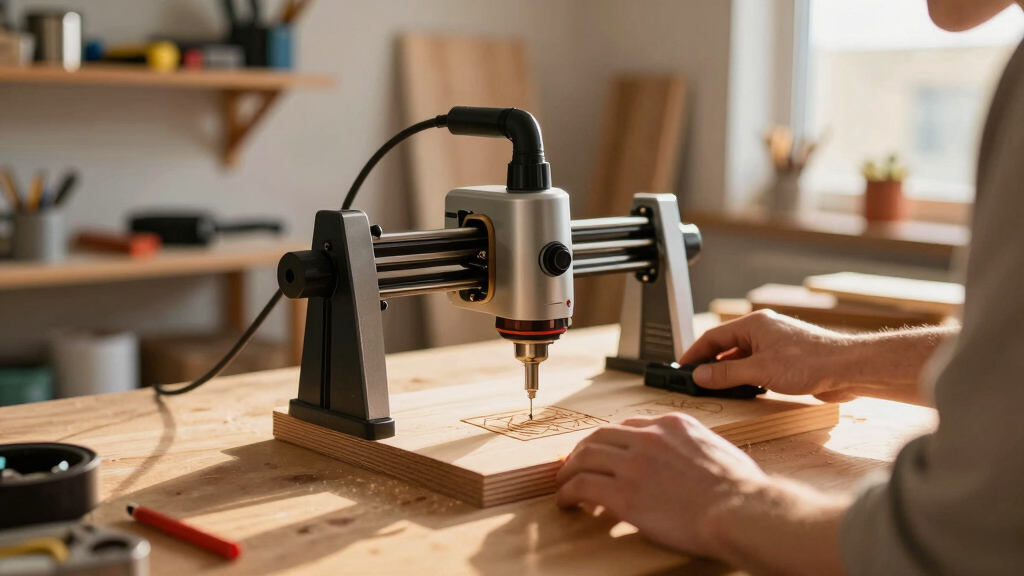

For anyone interested in woodworking, a diode laser engraver can transform projects with precision and detail. The best models balance power, ease of use, and versatility, but tradeoffs exist between cost, size, and features. The WIZMAKER Wand 12W stands out as the best overall pick for its reliable performance and user-friendly design. The xTool F2 Ultra 60W is a top choice for those needing higher power and advanced features, while the LaserPecker LP2 Plus offers a compact, budget-friendly option for beginners. Keep reading to see how these and other models compare to help you choose the right engraver for your woodworking projects.

Get business pricing on tools and workshop supplies
- Business-only prices and quantity discounts
- Tax-exempt purchasing
- Multiple users, one account, clear invoices
Complete the kit



Key Takeaways
- Power output varies significantly, impacting the types of projects feasible and the engraving speed.
- Size and build quality influence ease of use and portability — larger units often require dedicated workspace.
- Feature sets, such as dual lasers or integrated cameras, add versatility but increase complexity and cost.
- Budget options can handle basic engraving but may lack precision or durability for heavy use.
- Choosing the right model depends on your specific project scope, skill level, and budget constraints.
| WIZMAKER Wand 12W Laser Engraver, 300×300mm High-Power Diode Laser Cutter for Wood, Leather, Paper, MDF, Felt, Coated Metals, Dark Acrylic, DIY, Small Business Projects |  | Best Overall for Versatile Small-Scale Projects | Laser Power: 12W | Work Area: 300×300mm | Engraving Speed: up to 10,000 mm/min | VIEW LATEST PRICE | See Our Full Breakdown |
| ACMER S1 Laser Engraver Machine, 6000mW Laser Cutter for Wood and Acrylic | 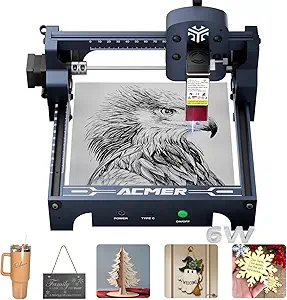 | Best Value for Beginners and Hobbyists | Laser Power: 6000mW | Wavelength: 455±5nm | Focal Length: 2mm | VIEW LATEST PRICE | See Our Full Breakdown |
| BlazeX M3 10W Laser Engraver Machine, Ultra-Precision Desktop Laser Cutter & Engraver for Wood, Metal, Glass, Leather |  | Best Premium for Ultra-Fine Detail and Small-Scale Metal Work | Laser Power: 10W | Precision: 0.01mm | Material Compatibility: Wood, Metal, Glass, Leather | VIEW LATEST PRICE | See Our Full Breakdown |
| xTool F2 Ultra 60W MOPA & 40W Diode Dual Laser Engraver |  | Best for High-Volume and Color Engraving on Metals | Laser Power (Fiber): 60W | Laser Power (Diode): 40W | Max Cutting Thickness Metal: 2mm | VIEW LATEST PRICE | See Our Full Breakdown |
| xTool F1 Ultra 20W Fiber & Diode Dual Laser Engraver |  | Best for Large-Scale, Professional-Looking Results | Laser Power: 20W fiber and diode lasers | Working Area: 220mm x 220mm, expandable to 220mm x 500mm | Max Speed: 10,000mm/s | VIEW LATEST PRICE | See Our Full Breakdown |
| LaserPecker LP2 Plus (Basic) 10W Diode Laser Engraver |  | Best Portable & Versatile for Small-Scale Woodworking | Laser Power: 10W | Speed: 4000mm/s | Material Compatibility: Wood, leather, acrylic, coated metal, glass, stone, cork, rubber, paper, food | VIEW LATEST PRICE | See Our Full Breakdown |
| xTool F2 5W IR & 15W Diode Dual Laser Engraver with Built-in 50MP Camera |  | Best for Versatility and Precise Multi-Material Engraving | Laser Power (IR): 5W | Laser Power (Diode): 15W | Camera Resolution: 50MP | VIEW LATEST PRICE | See Our Full Breakdown |
| xTool S1 40W Laser Cutter and Engraver with Rotary Bundle |  | Best for Large-Scale and Heavy-Duty Woodworking | Bed Size: 23.93″ x 15.16″ | Laser Power: 40W | Speed: 600mm/s | VIEW LATEST PRICE | See Our Full Breakdown |
| diode laser engraver for woodworking | Laser Power | Material Compatibility | Weight |
|---|---|---|---|
| WIZMAKER Wand 12W Laser Engrav | 12W | Wood, leather, paper, MDF, felt, coated metals, dark acrylic | — |
| ACMER S1 Laser Engraver Machin | 6000mW | — | 4.2 pounds |
| BlazeX M3 10W Laser Engraver M | 10W | Wood, Metal, Glass, Leather | 8 pounds |
| xTool F2 Ultra 60W MOPA & 40W | — | — | — |
| xTool F1 Ultra 20W Fiber & Dio | 20W fiber and diode lasers | Metals, wood, acrylic | — |
| LaserPecker LP2 Plus | 10W | Wood, leather, acrylic, coated metal, glass, stone, cork, rubber, paper, food | 3.39kg |
| xTool F2 5W IR & 15W Diode Dua | — | 300+ materials | 4.6 kg |
| xTool S1 40W Laser Cutter and | 40W | Wood, Metal, Acrylic, Curved surfaces | 86.8 pounds |
More Details on Our Top Picks
WIZMAKER Wand 12W Laser Engraver, 300×300mm High-Power Diode Laser Cutter for Wood, Leather, Paper, MDF, Felt, Coated Metals, Dark Acrylic, DIY, Small Business Projects
The WIZMAKER Wand 12W stands out for its balance of precision, material compatibility, and ease of use, making it the ideal choice for hobbyists and small businesses that need reliable results across a variety of materials. Its 12W laser offers precise engraving with 0.1mm accuracy, comparable to the BlazeX M3 but with a larger work area of 300×300mm, which supports more ambitious projects. However, unlike the xTool F2 Ultra, its laser power may be less effective on thicker or denser materials. Setup is straightforward for users with some technical familiarity, but beginners might find initial configuration a bit challenging. It’s perfect for those who want versatility without sacrificing safety, thanks to built-in features like tilt detection and flame monitoring. The main tradeoff is its limited laser power, which restricts cutting thicker materials; for small-scale projects, this is less of an issue. Overall, this engraver suits creatives seeking a reliable, multi-material device with a generous work area.
Pros:- High-precision engraving with 0.1mm accuracy
- Supports a wide range of materials including metals and coated surfaces
- Large 300×300mm work area for bigger projects
- Built-in safety features for reliable operation
Cons:- Requires some technical setup, which may challenge beginners
- Limited laser power restricts cutting thickness on dense materials
Best for: DIY enthusiasts and small business owners working on detailed projects across various thin materials.
Not ideal for: Users needing to cut or engrave very thick materials or large-scale batch production, due to its moderate laser power and size.
- Laser Power:12W
- Work Area:300×300mm
- Engraving Speed:up to 10,000 mm/min
- Material Compatibility:Wood, leather, paper, MDF, felt, coated metals, dark acrylic
- Cutting Capacity:up to 8mm on wood
- Connectivity:Wi-Fi, hotspot, USB
- Supported Software:LightBurn, LaserGRBL
- Protection Features:Tilt detection, flame monitoring
- Warranty:12 months
Our verdict“This engraver makes the most sense for users who want versatility and precision in small-scale woodworking and craft projects.”
ACMER S1 Laser Engraver Machine, 6000mW Laser Cutter for Wood and Acrylic
The ACMER S1 offers a compelling mix of high-precision detail and user-friendly operation, making it a top choice for those just starting out or working on small projects. Its 6000mW diode laser delivers fine details, comparable to the BlazeX M3’s 10W, but with a significantly smaller 130x130mm work area which limits larger projects. Compared to the WIZMAKER Wand, the ACMER S1 is more compact and easier to set up, though less versatile for bigger workpieces. Its compatibility with popular software like LightBurn simplifies the workflow for beginners, but the limited size and safety considerations due to laser class certification suggest it’s best for hobbyists rather than industrial use. The main tradeoff is the small working area, which may frustrate those wanting to produce larger items. Still, it’s an excellent starting point for precision engraving on small items.
Pros:- High-precision engraving with detailed 0.01mm repeatability
- Compact, lightweight, and easy to set up
- Preassembled design for quick start
- Compatible with popular software
Cons:- Limited working area restricts larger projects
- Requires careful handling due to laser safety considerations
Best for: Hobbyists and small-scale artisans focusing on detailed work on small materials.
Not ideal for: Users planning to work on larger pieces or needing to cut thick materials, due to its small work area and moderate laser power.
- Laser Power:6000mW
- Wavelength:455±5nm
- Focal Length:2mm
- Max Speed:10,000mm/min
- Repeatability:0.01mm
- Working Area:130x130mm
- Weight:4.2 pounds
- Dimensions:9.84 x 9.84 x 6.38 inches
Our verdict“This engraver fits those seeking precision and ease of use for small projects, especially beginners exploring woodworking details.”
BlazeX M3 10W Laser Engraver Machine, Ultra-Precision Desktop Laser Cutter & Engraver for Wood, Metal, Glass, Leather
The BlazeX M3 appeals to users who need ultra-fine detail, offering a remarkable 0.01mm engraving precision that surpasses many diode options, including the ACMER S1. Its 10W laser handles metallic and non-metallic materials alike, making it ideal for jewelry, intricate engravings, and detailed artwork. Compared to the WIZMAKER Wand, the BlazeX sacrifices some work area size for precision, but its inclusion of a comprehensive starter kit and safety features makes it a stand-out for those new to laser engraving. Its small size limits larger project capabilities, but for detailed work on small items, it excels. The technical setup may challenge beginners, but the results justify the effort for fine craftsmanship. It’s best suited for hobbyists or professionals focused on detail rather than volume.
Pros:- Extremely high-precision 0.01mm detail
- Suitable for engraving and cutting metals and delicate materials
- Includes comprehensive starter kit with safety features
- Compatible with multiple software platforms
Cons:- Limited to small-scale projects due to size
- Requires technical setup and handling of delicate equipment
Best for: Artists and small-scale artisans needing ultra-fine, detailed engraving on small objects and metals.
Not ideal for: Those looking to work on larger projects or cut thick materials, due to its small working area and limited laser power for heavy-duty cuts.
- Laser Power:10W
- Precision:0.01mm
- Material Compatibility:Wood, Metal, Glass, Leather
- Weight:8 pounds
- Material Type:Metal
- Color:Standard
Our verdict“This device is ideal for detail-oriented users who prioritize precision over project size or volume.”
xTool F2 Ultra 60W MOPA & 40W Diode Dual Laser Engraver
The xTool F2 Ultra combines a powerful 60W MOPA fiber laser with a 40W diode laser, making it the most versatile and high-capacity option in this lineup. Its ability to cut through metal up to 2mm thick and engrave over 100 colors on metal surfaces clearly outpaces the other options in size and strength. The large, expandable workspace and AI-powered features make it suitable for professional workshops or high-volume production. However, the complex setup and Class 4 laser safety requirements demand a higher level of technical skill and safety awareness. While the BlazeX M3 excels in ultra-fine detail, the F2 Ultra’s power and color capabilities target users who need vibrant, detailed metal work on a larger scale. Its high price reflects its advanced features, making it less suitable for casual hobbyists.
Pros:- Powerful dual-laser system for versatile material processing
- Capable of engraving over 100 colors on metals
- Large, expandable work area for bigger projects
- AI-powered features for precise operation
Cons:- Complex setup requiring technical knowledge
- High cost and safety precautions due to Class 4 laser
Best for: Professionals or serious hobbyists needing high-volume, multi-material engraving with vibrant color options.
Not ideal for: Casual users or those working on small or simple projects, due to its complexity and cost.
- Laser Power (Fiber):60W
- Laser Power (Diode):40W
- Max Cutting Thickness Metal:2mm
- Max Cutting Thickness Acrylic:20mm
- Max Cutting Thickness Wood:23mm
- Engraving Colors on Metal:Over 100
- Positioning Accuracy:0.2mm
- Work Area:8.7″ x 8.7″ (expandable to 8.7″ x 19.7″)
Our verdict“This engraver suits experienced users seeking a high-capacity, multi-material machine for professional or industrial applications.”
xTool F1 Ultra 20W Fiber & Diode Dual Laser Engraver
The xTool F1 Ultra combines dual lasers—fiber and diode—delivering 20W of power with a substantial work area of 220mm x 220mm, expandable to 500mm with an auto conveyor. Its integrated 16MP SMART CAMERA and high speed of 10,000mm/s enable rapid, detailed engravings on a wide array of materials including metals, wood, and acrylic. It is well-suited for professionals or businesses that require fast turnaround and larger working zones. While the auto conveyor adds convenience, it is sold separately, and the setup involves some technical skill—similar to the complexities faced with the F2 Ultra. Compared with the BlazeX M3, it offers a larger workspace and faster speeds, making it more suitable for high-volume projects. Safety precautions are necessary due to its Class 4 laser—similar to the F2 Ultra—so it’s not for casual hobbyists.
Pros:- Large, expandable working area for bigger projects
- Fast operation with speeds up to 10,000mm/s
- Supports engraving on metals, wood, and acrylic
- Integrated high-resolution camera for precise positioning
Cons:- Auto conveyor sold separately, increasing total cost
- Complex setup with safety precautions required for Class 4 laser
Best for: Professional artists or businesses needing large-area, fast, multi-material engraving with high throughput.
Not ideal for: Hobbyists or occasional users who don’t require rapid processing or large work surfaces, due to setup complexity and safety demands.
- Laser Power:20W fiber and diode lasers
- Working Area:220mm x 220mm, expandable to 220mm x 500mm
- Max Speed:10,000mm/s
- Camera:16MP SMART CAMERA
- Material Compatibility:Metals, wood, acrylic
- Safety Features:Enclosed cover, smoke extraction, fire alarm, emergency stop
Our verdict“This engraver makes sense for busy professionals and businesses demanding large, fast, and versatile engraving capabilities across multiple materials.”
LaserPecker LP2 Plus (Basic) 10W Diode Laser Engraver
The LaserPecker LP2 Plus stands out for its portability and speed, making it ideal for woodworkers who need quick, on-the-go engraving. Unlike larger models like the xTool S1, its lightweight design (just over 3.3kg) allows for easy transport and setup in various locations. The 10W laser provides sufficient power for detailed work on thin woods, leather, and acrylic, but it falls short when tackling thicker or denser materials—a clear tradeoff against the high-power 40W xTool S1. Its dual red-dot focus system simplifies focusing, improving precision without specialized tools. However, safety handling requires caution, especially for beginners unfamiliar with laser safety protocols. Overall, this engraver makes sense for hobbyists or small businesses prioritizing mobility and versatility over raw cutting power.
Pros:- Lightweight and portable, easy to move between locations
- Fast engraving speed of 4000mm/s enhances productivity
- Capable of engraving on a wide array of materials, including food and coated metals
- Precise 4K resolution for detailed designs
Cons:- Limited to 10W power, restricting deep or thick cuts
- Requires careful handling due to laser safety considerations
- Learning curve for new users unfamiliar with laser operation
Best for: Woodworkers needing a portable, versatile machine for small projects and crafts.
Not ideal for: Professionals requiring heavy-duty cutting of thick or dense wood, as the 10W laser limits depth and speed.
- Laser Power:10W
- Speed:4000mm/s
- Material Compatibility:Wood, leather, acrylic, coated metal, glass, stone, cork, rubber, paper, food
- Weight:3.39kg
- Cutting Depth:up to 6mm
- Focus System:Dual red-dot focus
Our verdict“This is a smart choice for hobbyists and small-scale woodworkers seeking portability and quick results, but not for those needing heavy-duty cutting.”
xTool F2 5W IR & 15W Diode Dual Laser Engraver with Built-in 50MP Camera
The xTool F2 combines dual lasers and a high-resolution 50MP camera, making it a flexible choice for detailed projects across over 300 materials. Compared with the LaserPecker LP2 Plus, the dual laser setup significantly broadens material compatibility, including metals and thick substrates, with a higher level of precision thanks to its camera-assisted alignment. The 15W diode laser offers more power for deeper cuts than the LP2 Plus, but it still isn’t suited for very thick or dense woods, which might be better handled by the xTool S1. Its fully assembled design and rapid processing speeds (up to 6000mm/s) improve workflow, though the heavier weight (4.6kg) can affect portability. This machine makes the most sense for users who need versatility and high accuracy in a compact form, especially for multi-material projects.
Pros:- Dual laser system allows for engraving on a wide range of materials
- High-resolution 50MP camera enhances positioning accuracy
- Fast processing speeds improve workflow efficiency
- Fully assembled, ready to use right out of the box
Cons:- Relatively high power output requires careful safety precautions
- Heavy for portable use, limiting on-the-go applications
- Limited details on software compatibility and interface
Best for: Woodworkers and crafters who want precise, multi-material engraving with quick setup and high detail.
Not ideal for: Those focusing on large, heavy-duty woodworking projects involving thick or dense lumber, due to its moderate power and weight.
- Laser Power (IR):5W
- Laser Power (Diode):15W
- Camera Resolution:50MP
- Max Speed:6000mm/s
- Weight:4.6 kg
- Material Compatibility:300+ materials
Our verdict“This is an excellent choice for users seeking detailed, multi-material engraving with precision and speed, though it may be less ideal for large-scale woodworking involving thick timber.”
xTool S1 40W Laser Cutter and Engraver with Rotary Bundle
The xTool S1 40W offers serious power and size for demanding woodworking projects, capable of cutting through 18mm wood and handling large pieces thanks to its expansive 23.93″ x 15.16″ bed. Its 40W laser outperforms the other options in cutting depth and speed, making it ideal for professionals or serious hobbyists working with thick, dense, or multiple pieces. The inclusion of safety features like an enclosure, flame sensors, and emergency stop enhances user confidence during heavy-duty tasks. Compared with the more compact and lower-powered models like the LP2 Plus or F2, the S1 is bulkier and more complex to set up, but it provides a level of power and size that justifies the tradeoff for large-scale projects. For those needing maximum cutting capacity and safety, this machine is the logical pick.
Pros:- High-powered 40W laser for fast, precise cuts in thick wood
- Large bed size accommodates big projects and multiple pieces
- Advanced safety features for secure operation
- User-friendly software with AI design tools
Cons:- Very heavy and bulky, requiring significant workspace
- Complex setup not suited for beginners
- Price not specified but generally higher, reflecting its professional-grade features
Best for: Professional woodworkers and large-scale hobbyists requiring powerful, large-bed cutting and engraving capabilities.
Not ideal for: Small craft hobbyists or casual users with limited space, as its size and complexity are overkill for small projects.
- Bed Size:23.93″ x 15.16″
- Laser Power:40W
- Speed:600mm/s
- Material Compatibility:Wood, Metal, Acrylic, Curved surfaces
- Safety Features:Enclosed design, flame sensors, emergency stop
- Weight:86.8 pounds
Our verdict“This machine is ideal for professionals or serious hobbyists demanding maximum power and large work areas in woodworking projects.”
How We Picked
These products were selected based on a combination of performance, build quality, usability, and value for woodworking applications. We prioritized models with enough power to handle different materials, straightforward interfaces, and reliable durability. Features such as safety, maintenance requirements, and expandability influenced the rankings. Each product was evaluated against these criteria to identify which best fit different user needs, from hobbyists to small business owners, resulting in a lineup that balances power, price, and usability.Factors to Consider When Choosing Best Diode Laser Engraver For Woodworking
When choosing a diode laser engraver for woodworking, it’s important to consider several factors that directly impact your experience and results. Understanding these will help you avoid common pitfalls like overspending on unnecessary features or selecting a machine too weak for your projects. This guide covers key considerations to help you find a model that matches your needs and skill level, ensuring you get the best value and performance.Power and Material Compatibility
Power output determines what materials you can engrave and how quickly you can complete projects. For woodworking, a laser with at least 10W is recommended for clean, precise engraving on wood, plywood, and MDF. Higher wattages, such as 20W or more, expand capabilities to thicker materials and more detailed work, but come at a higher cost and increased complexity. Matching power to your typical project size and material thickness helps avoid frustration or underperformance.
Size and Work Area
The engraving bed size affects how large your projects can be. Smaller units, around 300×300mm, are more portable and easier to fit into home workshops, but limit the size of workpieces. Larger work areas, like 600×600mm, are suitable for bigger projects but tend to be more expensive and require more space. Assess your typical project dimensions to choose a size that balances convenience with capability.
Ease of Use and Software Compatibility
User-friendly interfaces and compatible software are vital, especially for beginners. Look for models with intuitive controls, clear instructions, and reliable software that works with standard design tools like SVG or DXF files. Some engravers include integrated cameras or preview features, reducing mistakes. Complexity and learning curve vary, so consider your experience level before opting for more advanced features that may require additional training.
Safety and Maintenance
Laser safety features, such as enclosed housings, emergency stops, and proper ventilation, are essential for safe operation. Regular maintenance, including cleaning lenses and checking wiring, prolongs lifespan and performance. Cheaper models may lack safety features, increasing risk, while premium units often include built-in safeguards. Consider your workspace environment and safety priorities when selecting a model.
Budget and Long-Term Value
While budget models might seem attractive initially, they can limit your project scope and durability over time. Investing a bit more in a reliable, well-built machine often results in better results and fewer frustrations. Evaluate the long-term value based on features, potential upgrade options, and manufacturer support. Remember, a higher upfront investment can be more economical if it reduces downtime and replacement costs.
Frequently Asked Questions
What wattage should I look for in a diode laser engraver for woodworking?
For woodworking projects, a diode laser with at least 10W of power is recommended. This ensures clean engraving and cutting on typical materials like wood and MDF. Higher wattages, such as 20W or more, enable faster work and the ability to handle thicker or denser materials. Your choice depends on project complexity; for hobbyist use, 10-15W often suffices, while small businesses may benefit from more powerful options for efficiency.
Are dual-laser models worth the extra cost for woodworking?
Dual-laser models can offer increased versatility, such as combining different wavelengths or laser types for specialized tasks. For woodworking, they often provide sharper detail or faster engraving speeds. However, they are generally more expensive and complex to operate. If your focus is primarily on basic engraving and cutting, a single, high-quality diode laser usually provides more straightforward performance without the added cost and potential maintenance issues.
How important is software compatibility for woodworking laser engravers?
Software compatibility significantly impacts your workflow, especially if you already use design programs like Adobe Illustrator or CorelDRAW. A compatible and user-friendly interface reduces setup time and errors. Many models support common file formats, but some proprietary software can limit flexibility. Choosing a machine with broad compatibility ensures smoother operation and easier project customization, particularly if you plan to scale your woodworking projects.
What safety features should I prioritize in a diode laser engraver?
Safety features such as enclosed laser cavities, emergency stop buttons, and proper ventilation are essential. Enclosures prevent accidental exposure to laser beams, while ventilation reduces harmful fumes from engraving wood. Some units include auto-shutdown features if safety conditions are breached. Prioritizing these features helps protect your health and ensures compliance with safety standards, especially in a home workshop or small studio setting.
Is it better to buy a more powerful laser or one with a larger work area?
The decision depends on your primary needs. A more powerful laser allows for engraving and cutting thicker or denser materials, enabling more detailed and faster work. Conversely, a larger work area is essential if you frequently handle bigger projects. If space permits and your projects vary in size, balancing both factors is ideal, but most users find that power tends to influence project scope more than size, especially for detailed woodworking work.
Conclusion
For casual hobbyists or those new to laser engraving, the LaserPecker LP2 Plus offers an accessible, budget-friendly start with decent performance. Small business owners or serious woodworkers will find the WIZMAKER Wand 12W to be a reliable, well-rounded choice, blending power and ease of use. Those requiring higher precision and faster throughput should consider the xTool F2 Ultra 60W for its advanced features and robust construction. Ultimately, selecting the best model hinges on your project size, budget, and experience level—making it important to match the machine to your specific woodworking ambitions.
As an affiliate, we earn on qualifying purchases.Fall Picks
fall essentials