For portable SSD drives for speed, I put the Samsung T9 first for its advertised transfer rates of up to 2,000 MB/s, with the SanDisk Extreme PRO 2TB and Lexar SL500 as standout alternatives for higher-capacity or slim, fast storage. Those headline speeds depend on having a compatible USB 3.2 Gen 2×2 port; on more common connections, a drive rated around 1,000 MB/s may perform similarly in everyday use. Buyers also have to balance ruggedness, capacity, portability, and compatibility rather than choosing by the largest speed figure alone. I ranked these 10 drives around practical speed potential and their tradeoffs. Read on for the full breakdown and help matching a drive to your setup.

Get business pricing on tools and workshop supplies
- Business-only prices and quantity discounts
- Tax-exempt purchasing
- Multiple users, one account, clear invoices
Complete the kit



Key Takeaways
- The T9 and other USB 3.2 Gen 2×2 drives have the highest advertised ceilings, but a compatible host connection is needed to make use of them.
- USB 3.2 Gen 2 models can be the more practical speed choice when a laptop or console lacks Gen 2×2 support.
- The T7 Shield prioritizes rugged protection while retaining a 1,050 MB/s advertised speed ceiling, making it a different kind of pick from the faster-rated T9.
- Capacity changes the shortlist: the 2TB SanDisk Extreme PRO and Samsung T7 Shield suit larger working libraries, while several 1TB choices favor lighter storage needs.
- The older SanDisk Extreme PRO and Extreme models need extra scrutiny; buyers should confirm the exact generation and specifications rather than assume they match newer versions.
| Samsung T9 Portable SSD 1TB, USB 3.2 Gen 2×2 External SSD, Up to 2,000 MB/s |  | Best Overall for High-Speed Transfers | Capacity: 1 TB | Interface: USB 3.2 Gen 2×2 | Read speed: Up to 2,000 MB/s | VIEW ON AMAZON | See Our Full Breakdown |
| SanDisk Extreme Portable SSD – 1TB |  | Best for Everyday Portable Backups | Capacity: 1 TB | Read speed: Up to 1,000 MB/s | Data transfer rate: 1,000 MB/s | VIEW ON AMAZON | See Our Full Breakdown |
| Western Digital 1TB P40 Game Drive SSD – Up to 2,000MB/s, RGB Lighting, Portable External Solid State Drive |  | Best for Gaming Setups | Capacity: 1 TB | Interface: USB 3.2 | Read speed: Up to 2,000 MB/s | VIEW ON AMAZON | See Our Full Breakdown |
| SanDisk 2TB Extreme PRO Portable SSD |  | Best Premium Speed and Capacity | Capacity: 2 TB | Maximum read speed: Up to 4,000 MB/s | Average sustained write speed: 3,100 MB/s for 2TB–4TB models | VIEW ON AMAZON | See Our Full Breakdown |
| SanDisk 1TB Extreme PRO Portable SSD (Old Model) | 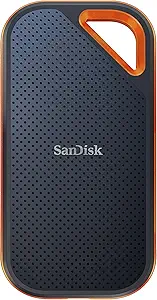 | Best Rugged 2,000 MB/s Option | Capacity: 1 TB | Read speed: Up to 2,000 MB/s | Write speed: Up to 2,000 MB/s | VIEW ON AMAZON | See Our Full Breakdown |
| SanDisk 2TB Extreme Portable SSD (Old Model) |  | Best for Rugged 2TB Storage | Capacity: 2TB | Read speed: Up to 1,050MB/s | Write speed: Up to 1,000MB/s | VIEW ON AMAZON | See Our Full Breakdown |
| SanDisk 1TB Portable SSD, Up to 800MB/s Read Speeds, Black |  | Best for Everyday Portable Transfers | Capacity: 1TB | Read speed: Up to 800MB/s | Interface: USB 3.2 | VIEW ON AMAZON | See Our Full Breakdown |
| Samsung T7 Shield Portable SSD 2TB, USB 3.2 Gen 2, Up to 1,050 MB/s |  | Best for Rugged Cross-Device Use | Capacity: 2TB | Interface: USB 3.2 Gen 2 | Read speed: Up to 1,050MB/s | VIEW ON AMAZON | See Our Full Breakdown |
| Samsung T7 Portable SSD 1TB Titan Gray, USB 3.2 Gen 2, Up to 1,050MB/s |  | Best for Fast Everyday Carry | Capacity: 1TB | Interface: USB 3.0 | Maximum read speed: Up to 1,050MB/s | VIEW ON AMAZON | See Our Full Breakdown |
| Lexar 1TB SL500 External SSD, USB 3.2 Gen 2×2, Slim |  | Best for Maximum Advertised Speed | Capacity: 1TB | Read speed: Up to 2,000MB/s | Write speed: Up to 1,800MB/s | VIEW ON AMAZON | See Our Full Breakdown |
| portable ssd drives for speed | Capacity | Interface | Read speed | Drop protection |
|---|---|---|---|---|
| Samsung T9 Portable SSD 1TB | 1 TB | USB 3.2 Gen 2×2 | Up to 2,000 MB/s | — |
| SanDisk Extreme Portable SSD | 1 TB | — | Up to 1,000 MB/s | — |
| Western Digital 1TB P40 Game D | 1 TB | USB 3.2 | Up to 2,000 MB/s | — |
| SanDisk 2TB Extreme PRO Portab | 2 TB | — | — | Up to 3 m |
| SanDisk 1TB Extreme PRO Portab | 1 TB | NVMe | Up to 2,000 MB/s | Up to 3 m |
| SanDisk 2TB Extreme Portable S | 2TB | NVMe | Up to 1,050MB/s | Up to 3 meters |
| SanDisk 1TB Portable SSD | 1TB | USB 3.2 | Up to 800MB/s | Up to 2 meters |
| Samsung T7 Shield Portable SSD | 2TB | USB 3.2 Gen 2 | Up to 1,050MB/s | Up to 9.8 feet |
| Samsung T7 Portable SSD 1TB Ti | 1TB | USB 3.0 | — | Up to 6 feet |
| Lexar 1TB SL500 External SSD | 1TB | USB 3.2 Gen 2×2 | Up to 2,000MB/s | — |
More Details on Our Top Picks
Samsung T9 Portable SSD 1TB, USB 3.2 Gen 2×2 External SSD, Up to 2,000 MB/s
The Samsung T9 is my strongest all-around pick for speed when the host device supports USB 3.2 Gen 2×2: its stated read and write speeds both reach 2,000 MB/s, making large project transfers quicker than on the 1,000 MB/s SanDisk Extreme Portable SSD. Thermal management is intended to help maintain performance during demanding use, while AES 256-bit hardware encryption adds protection for sensitive files. Its broad listed compatibility, including computers, selected phones, and consoles, also gives it more flexibility than the gaming-focused WD_BLACK P40. The main catch is the interface: connected to a slower port, it cannot deliver its headline speed. At 1TB, capacity may also feel tight for creators storing extensive video libraries.
Pros:- Read and write speeds rated up to 2,000 MB/s
- Thermal management designed for demanding transfers
- AES 256-bit hardware encryption
- Listed compatibility includes computers, tablets, selected iPhones, and gaming consoles
Cons:- Maximum speed requires USB 3.2 Gen 2×2 support
- The 1TB capacity may limit large media libraries
- Optimal use may require choosing suitable cables
Best for: Creators and power users with a USB 3.2 Gen 2×2 computer who move large files and want hardware encryption.
Not ideal for: People using devices without USB 3.2 Gen 2×2 who want to benefit from the drive’s maximum speed, or anyone needing more than 1TB for large archives.
- Capacity:1 TB
- Interface:USB 3.2 Gen 2×2
- Read speed:Up to 2,000 MB/s
- Write speed:Up to 2,000 MB/s
- Encryption:AES 256-bit hardware encryption
- Form factor:2.5-inch
- Drop resistance:Up to 9.8 ft
- Listed compatibility:Mac, PC, tablet, iPhone 15/16, Xbox Series S/X, PlayStation 4/5
Our verdict“Choose the Samsung T9 if your device supports Gen 2×2 and you want fast transfers with encryption in a versatile 1TB drive.”
SanDisk Extreme Portable SSD – 1TB
The SanDisk Extreme Portable SSD suits people who value a straightforward, travel-friendly drive more than the highest transfer ceiling. Its listed read speed of up to 1,000 MB/s is half the T9’s stated maximum, but still targets quicker file handling than a conventional hard drive. USB-C connectivity and stated Mac, iPhone, and iPad compatibility make it a practical fit for moving photos and project files between Apple devices. Compared with the 2,000 MB/s WD_BLACK P40, this model gives up peak speed and gaming-oriented features in favor of a simpler portable-storage role. The provided details don’t specify a write speed, included cable, or a durability rating, so buyers needing those assurances should compare it with the more fully specified rugged options.
Pros:- Read speed rated up to 1,000 MB/s
- USB-C connectivity
- Listed compatibility with Mac, iPhone, and iPad
- Compact design intended for portable use
Cons:- Lower stated read-speed ceiling than the Samsung T9 and WD_BLACK P40
- The supplied product details do not state a write speed
- No cable or accessories are specified
Best for: Mac, iPhone, and iPad owners who need a compact 1TB drive for routine creative-file transfers and backups.
Not ideal for: Video editors moving very large files under tight deadlines, or buyers who require a documented write-speed or ruggedness rating.
- Capacity:1 TB
- Read speed:Up to 1,000 MB/s
- Data transfer rate:1,000 MB/s
- Connectivity:USB-C
- Color:Black
- Listed compatibility:Mac, iPhone, and iPad
Our verdict“Pick this SanDisk for everyday Apple-device transfers if 1,000 MB/s-class read speed is enough and you do not need a documented write rating.”
Western Digital 1TB P40 Game Drive SSD – Up to 2,000MB/s, RGB Lighting, Portable External Solid State Drive
The WD_BLACK P40 Game Drive brings a high stated speed ceiling—up to 2,000 MB/s read—to a portable drive built around gaming and setup personalization. That matches the T9’s listed read speed, while the P40 adds customizable RGB lighting through WD_BLACK Dashboard on Windows. For players moving a game library between compatible systems, the shock-resistant design adds useful portability. It is less compelling as a general-purpose speed pick: the Samsung T9 lists 2,000 MB/s for both read and write, while the P40’s supplied data gives a 1,950 MB/s media speed but no clearly stated write rating. RGB customization is Windows-only, and actual performance depends on the host device, so console and Mac buyers should prioritize compatibility and transfer needs over lighting.
Pros:- Read speed rated up to 2,000 MB/s
- Shock-resistant design for portable use
- Customizable RGB lighting through Windows software
- Listed for gaming consoles, laptops, and compatible PC or Mac setups
Cons:- RGB customization is limited to Windows
- The supplied specifications do not clearly state a write speed
- Performance varies with the host device and conditions
Best for: PC and console gamers who want a portable 1TB game drive with a high read-speed rating and Windows-configurable RGB.
Not ideal for: Buyers focused on dependable, explicitly rated write speeds or people who want to customize RGB from a Mac or console.
- Capacity:1 TB
- Interface:USB 3.2
- Read speed:Up to 2,000 MB/s
- Media speed:1,950 MB/s
- Form factor:2.5-inch
- Enclosure material:Polycarbonate
- Lighting:Customizable RGB via WD_BLACK Dashboard on Windows
- Listed compatible devices:Gaming consoles and laptops
Our verdict“Choose the P40 if gaming portability and Windows-controlled RGB matter as much as its high read-speed rating.”
SanDisk 2TB Extreme PRO Portable SSD
For high-volume work, the SanDisk 2TB Extreme PRO has the most ambitious speed figures in this group: up to 4,000 MB/s read and an average sustained write speed of 3,100 MB/s for the 2TB–4TB models. That combination targets workflows where moving large media batches matters more than saving space or choosing a simpler drive. Its 2TB capacity doubles the Samsung T9’s, and IP65 protection plus stated 3-meter drop protection add reassurance for field work. AES hardware encryption with password protection is another practical advantage for sensitive projects. The tradeoff is that those peak speeds depend on a suitably capable host, and the sustained-write figure is model-specific. It is a stronger fit for demanding production transfers than the 1,000 MB/s SanDisk Extreme, but excessive for ordinary backups.
Pros:- Read speed rated up to 4,000 MB/s
- 2TB capacity for larger active projects
- Average sustained write speed of 3,100 MB/s specified for 2TB–4TB models
- IP65 rating, up to 3m drop protection, and password-protected AES hardware encryption
Cons:- Peak performance depends on a compatible high-speed host
- The stated sustained-write figure applies to 2TB–4TB models
- Its performance focus may be unnecessary for routine backups
Best for: Video professionals and post-production teams transferring large projects who have compatible high-speed ports and need 2TB of storage.
Not ideal for: Casual backup users, or buyers whose computer cannot take advantage of the drive’s high speed ratings.
- Capacity:2 TB
- Maximum read speed:Up to 4,000 MB/s
- Average sustained write speed:3,100 MB/s for 2TB–4TB models
- Encryption:256-bit AES hardware encryption with password protection
- Water and dust resistance:IP65
- Drop protection:Up to 3 m
Our verdict“Choose this 2TB Extreme PRO for demanding large-file workflows if your host can support its unusually high speed ratings.”
SanDisk 1TB Extreme PRO Portable SSD (Old Model)
The older SanDisk Extreme PRO 1TB remains a speed-oriented choice for buyers who want a rugged enclosure without stepping up to the newer 2TB model. It is rated for read and write speeds up to 2,000 MB/s, and its forged aluminum chassis doubles as a heatsink. That gives it a different appeal from the Samsung T9: both list 2,000 MB/s-class performance, but this SanDisk emphasizes IP65 protection, 3-meter drop resistance, and a carabiner loop for carrying. Compared with the newer 2TB Extreme PRO, it has half the capacity and lower stated peak read speed. It is also explicitly an old model, and actual performance depends on the host and usage conditions. Buyers seeking the fastest transfers in this lineup should look at the 2TB version instead.
Pros:- Read and write speeds rated up to 2,000 MB/s
- IP65 water and dust resistance with up to 3m drop protection
- Forged aluminum chassis designed to act as a heatsink
- AES 256-bit hardware encryption and a carabiner loop
Cons:- Identified as an old model
- 1TB capacity is less than the 2TB Extreme PRO
- Actual speeds can fall below ratings depending on host and use
Best for: Field creators who need a rugged 1TB drive with a carabiner loop, hardware encryption, and 2,000 MB/s-class rated speeds.
Not ideal for: Buyers who want the highest available speed or 2TB capacity, or prefer a current model over an older version.
- Capacity:1 TB
- Read speed:Up to 2,000 MB/s
- Write speed:Up to 2,000 MB/s
- Interface:NVMe
- Drop protection:Up to 3 m
- Water and dust resistance:IP65
- Encryption:256-bit AES hardware encryption
- Chassis:Forged aluminum heatsink
- Model:Old model
Our verdict“Pick this older Extreme PRO if rugged portability and 2,000 MB/s-class ratings matter more to you than newer-model status or 2TB capacity.”
SanDisk 2TB Extreme Portable SSD (Old Model)
I’d choose this older Extreme when 2TB capacity and field protection matter more than having the newest transfer performance. Its NVMe drive reaches up to 1,050MB/s read and 1,000MB/s write, matching the listed speeds of the Samsung T7 Shield, while its IP65 rating and 3-meter drop protection suit travel and outdoor work. The carabiner loop also gives it a practical attachment point that the standard Samsung T7 does not offer in the supplied details.
The tradeoff is its age: newer drives, including the Lexar SL500, advertise higher peak speeds, though that advantage depends on a compatible host connection. Actual transfer rates can also fall below the stated maximum. I’d favor this SanDisk for rugged, high-capacity carrying and its 256-bit AES hardware encryption; I’d skip it if your priority is the fastest available transfers or a newer model.
Pros:- Up to 1,050MB/s read and 1,000MB/s write speeds
- 2TB capacity for large video, photo, and project libraries
- IP65 water and dust resistance with up to 3-meter drop protection
- 256-bit AES hardware encryption and a carabiner loop
Cons:- Older model, with newer options in the lineup advertising higher performance
- Actual speeds depend on the connected host device
- The supplied product details do not specify included cables or backup software
Best for: Photographers and mobile workers who need 2TB of storage, outdoor protection, and hardware encryption in a portable drive.
Not ideal for: Buyers chasing the highest advertised speeds or newer hardware; the Lexar SL500 lists higher peak transfer rates, and this is an older SanDisk model.
- Capacity:2TB
- Read speed:Up to 1,050MB/s
- Write speed:Up to 1,000MB/s
- Interface:NVMe
- Water and dust resistance:IP65
- Drop protection:Up to 3 meters
- Encryption:256-bit AES hardware encryption
- Non-operating temperature:-20°C to 85°C
Our verdict“Choose this SanDisk if you want 2TB, rugged protection, and hardware encryption more than the newest speed ceiling.”
SanDisk 1TB Portable SSD, Up to 800MB/s Read Speeds, Black
This is the straightforward, lower-speed SanDisk pick for moving everyday files without needing gigabyte-per-second-class performance. Its advertised read speed reaches 800MB/s, below the Samsung T7’s 1,050MB/s and well behind the Lexar SL500’s 2,000MB/s ceiling. For routine laptop backups, document libraries, or a portable game collection, that difference may matter less than the compact design and two-meter drop protection.
A rubber hook helps attach the drive to a bag or other gear, adding a practical portability feature. The key compromise is that the supplied specs list a read speed but no corresponding write-speed figure, so I wouldn’t pick it for predictable, high-volume video exports. It also lists no backup or encryption features. Compared with the more capable Samsung T7, this SanDisk makes more sense when ordinary transfers and simple carrying are the priority.
Pros:- Advertised read speeds up to 800MB/s
- Drop protection up to two meters
- Rubber hook for attaching the drive to mobile gear
- USB 3.2 connectivity and compatibility with laptops, tablets, and game consoles
Cons:- No write-speed figure is provided in the supplied product details
- Slower advertised read speed than the Samsung T7 and Lexar SL500
- No backup or encryption features are specified
Best for: Students and everyday laptop users who need a compact 1TB drive for documents, media, and routine file transfers.
Not ideal for: Video editors and other users moving large files frequently who need a stated high write speed, encryption, or faster transfers.
- Capacity:1TB
- Read speed:Up to 800MB/s
- Interface:USB 3.2
- Form factor:2.5 inches
- Drop protection:Up to 2 meters
- Enclosure material:Rubber
- Compatible devices:Laptop, tablet, video game console
- Color:Black
Our verdict“Pick this SanDisk for routine portable storage and basic ruggedness, but choose a faster model for frequent large-file transfers.”
Samsung T7 Shield Portable SSD 2TB, USB 3.2 Gen 2, Up to 1,050 MB/s
The T7 Shield pairs 2TB capacity with fast, well-balanced transfers and protection suited to work away from a desk. Its listed 1,050MB/s read and 1,000MB/s write speeds put it on par with the older SanDisk Extreme in this group, while its IP65 rating and drop protection up to 9.8 feet give it a clear outdoor-use case. Broad compatibility across computers, Android devices, consoles, and iPhone 15 Pro also makes it a flexible choice for mixed-device workflows.
Compared with the standard Samsung T7, the Shield is the more protective option; compared with the Lexar SL500, it gives up peak speed for ruggedness and an extra terabyte of capacity. Its USB 3.2 Gen 2 connection also means it does not claim the Lexar’s 2,000MB/s ceiling. The supplied details recommend the included cable for best performance, and they don’t mention a carrying case.
Pros:- Up to 1,050MB/s read and 1,000MB/s write speeds
- 2TB capacity for large working libraries
- IP65 water and dust resistance with drop protection up to 9.8 feet
- Broad compatibility and Samsung Magician drive monitoring software
Cons:- USB 3.2 Gen 2 peak speeds are below the Lexar SL500’s listed maximum
- Best performance is recommended with the included USB cable
- No carrying case is listed in the supplied product details
Best for: Mobile creators and field workers who need 2TB, IP65-rated protection, and compatibility across phones, computers, and consoles.
Not ideal for: Buyers focused on maximum transfer speed or a slimmer high-speed workflow; the Lexar SL500 lists up to 2,000MB/s but requires USB 3.2 Gen 2×2 for its peak performance.
- Capacity:2TB
- Interface:USB 3.2 Gen 2
- Read speed:Up to 1,050MB/s
- Write speed:Up to 1,000MB/s
- Technology:PCIe NVMe
- Water and dust resistance:IP65
- Drop protection:Up to 9.8 feet
- Software:Samsung Magician
- Compatibility:PC, Mac, Android, gaming consoles, iPhone 15 Pro
Our verdict“Choose the T7 Shield if you need fast 2TB storage that can handle travel and varied devices better than a speed-first slim drive.”
Samsung T7 Portable SSD 1TB Titan Gray, USB 3.2 Gen 2, Up to 1,050MB/s
The standard Samsung T7 is a good fit when fast transfers and easy everyday carrying matter more than extra weather protection. It lists read speeds up to 1,050MB/s, substantially ahead of the 800MB/s SanDisk Portable SSD, and includes USB-C-to-C and USB-C-to-A cables for connecting to a range of devices. Its shock-resistant design and drop protection add reassurance for a drive that travels between a desk and a bag.
Against the T7 Shield, this model is the less rugged choice: the Shield adds IP65 water and dust resistance, a higher stated drop-protection distance, and 2TB capacity. The standard T7 instead offers 1TB and a straightforward portable profile. It needs a USB 3.2 Gen 2 host to reach its maximum speed, and some devices may require reformatting. I’d choose it for frequent general file transfers, not for exposed outdoor work or maximum capacity.
Pros:- Read speeds up to 1,050MB/s
- Shock-resistant design with drop protection
- Includes USB Type-C-to-C and Type-C-to-A cables
- 256-bit AES hardware encryption
Cons:- Maximum speed requires USB 3.2 Gen 2 support from the host
- This model has 1TB capacity, less than the 2TB T7 Shield
- Some features may require reformatting for certain devices
Best for: Laptop and Android users who want a fast 1TB drive for regular file transfers and appreciate having both USB-C cable types included.
Not ideal for: Outdoor creators needing water and dust resistance or 2TB capacity; the Samsung T7 Shield is better suited to those demands.
- Capacity:1TB
- Interface:USB 3.0
- Maximum read speed:Up to 1,050MB/s
- Shock resistance:Yes
- Drop protection:Up to 6 feet
- Encryption:256-bit AES hardware encryption
- Included cables:USB Type-C-to-C and USB Type-C-to-A
- Color:Titan Gray
Our verdict“Choose the Samsung T7 for fast everyday transfers and included cable flexibility, but step up to the Shield for more capacity and weather protection.”
Lexar 1TB SL500 External SSD, USB 3.2 Gen 2×2, Slim
The Lexar SL500 has the highest listed speed in this group: up to 2,000MB/s read and 1,800MB/s write. That gives it a stronger case for large project transfers and compatible high-resolution recording workflows than the Samsung T7 or T7 Shield, both listed at up to 1,050MB/s read. Its USB 3.2 Gen 2×2 interface is the key qualifier: a computer or other host without that support may not deliver the advertised peak, so the number alone is not a reason to choose it.
The slim metal design favors portability, and the supplied details list support for 4K 60FPS recording directly to the drive. Unlike the rugged T7 Shield, though, the SL500 has no stated IP rating or drop-protection figure. It also lacks specified encryption or bundled software, and its 1TB capacity is half the Shield’s. I’d select it for a compatible speed-focused setup, not for exposed field use or larger storage needs.
Pros:- Listed read speeds up to 2,000MB/s and write speeds up to 1,800MB/s
- USB 3.2 Gen 2×2 interface for compatible systems
- Slim, lightweight metal design
- Supports 4K 60FPS recording directly to the drive
Cons:- Peak performance depends on USB 3.2 Gen 2×2 host support
- No encryption or software is specified in the supplied details
- No water, dust, or drop-protection rating is provided
Best for: Video creators and power users with USB 3.2 Gen 2×2 devices who prioritize fast transfers or supported 4K 60FPS direct recording.
Not ideal for: Buyers using hosts without USB 3.2 Gen 2×2, or those who need stated water, dust, and drop protection or 2TB capacity.
- Capacity:1TB
- Read speed:Up to 2,000MB/s
- Write speed:Up to 1,800MB/s
- Interface:USB 3.2 Gen 2×2
- Design:Slim, lightweight metal
- Compatibility:Mac, iPhone 15/16, laptops, cameras, Xbox X|S, PS4, PS5
- Recording support:4K 60FPS recording directly to the drive
Our verdict“Pick the Lexar SL500 for the highest listed speeds when your host supports Gen 2×2, but choose the T7 Shield for ruggedness and more capacity.”

How We Picked
I ranked these drives by how useful their speed is likely to be for real buyers, not by maximum advertised transfer rate alone. I weighed the stated interface and speed ceiling, capacity, portability, and build features, then considered whether those strengths suit common jobs such as moving large files, carrying project folders, or expanding a game library. Compatibility matters: a Gen 2×2 drive can offer a higher ceiling than a Gen 2 model, but the advantage may disappear when the host device cannot support that interface.
The order gives priority to a strong mix of speed potential and everyday usefulness, then makes room for picks with a clear specialty such as ruggedness, slim dimensions, or a simpler entry point. Products with similar listed speed ratings are separated by capacity, protection, or intended use. Older-model listings rank lower because generation details can be harder to compare and buyers should verify the exact specifications before choosing them.
| portable ssd drives for speed | Interface | Read speed | Write speed | Drop protection |
|---|---|---|---|---|
| Samsung T9 Portable SSD 1TB | USB 3.2 Gen 2×2 | Up to 2,000 MB/s | Up to 2,000 MB/s | — |
| SanDisk Extreme Portable SSD | — | Up to 1,000 MB/s | — | — |
| Western Digital 1TB P40 Game D | USB 3.2 | Up to 2,000 MB/s | — | — |
| SanDisk 2TB Extreme PRO Portab | — | — | — | Up to 3 m |
| SanDisk 1TB Extreme PRO Portab | NVMe | Up to 2,000 MB/s | Up to 2,000 MB/s | Up to 3 m |
| SanDisk 2TB Extreme Portable S | NVMe | Up to 1,050MB/s | Up to 1,000MB/s | Up to 3 meters |
| SanDisk 1TB Portable SSD | USB 3.2 | Up to 800MB/s | — | Up to 2 meters |
| Samsung T7 Shield Portable SSD | USB 3.2 Gen 2 | Up to 1,050MB/s | Up to 1,000MB/s | Up to 9.8 feet |
| Samsung T7 Portable SSD 1TB Ti | USB 3.0 | — | — | Up to 6 feet |
| Lexar 1TB SL500 External SSD | USB 3.2 Gen 2×2 | Up to 2,000MB/s | Up to 1,800MB/s | — |
Factors to Consider When Choosing Portable Ssd Drives For Speed
Speed ratings are a useful starting point, but the best drive depends on the connection, files, and conditions it will face. These factors help avoid paying for performance your device cannot use or choosing a fast drive that does not fit your workflow.
Check the host port before chasing peak speed
A drive’s advertised maximum is only one part of the transfer path; the computer, cable, and port also set limits. USB 3.2 Gen 2×2 is the connection behind the 2,000 MB/s class represented here, while the 1,050 MB/s models use USB 3.2 Gen 2. Many devices do not support Gen 2×2, and port labels can be unclear, so check the manufacturer’s specifications for the exact model. A fast drive connected to a slower port will still work, but it may not deliver its full speed advantage. If you move files between several computers, the slowest commonly used connection may matter more than the fastest one. Match the drive to your actual ports before spending more for a higher ceiling.
Match capacity to the size and lifespan of your workload
Capacity is not just a question of how many files fit today; it affects how often you need to reorganize or connect another drive. Large video projects, game libraries, and repeated backups can fill a 1TB drive sooner than expected, while documents and occasional transfers may not justify carrying 2TB. Leave room for working copies and future files instead of planning to use every available gigabyte. Also check whether the listed capacity and product generation match the specific listing, especially when comparing old and newer versions. A larger drive can simplify a mobile workflow, but it does not automatically transfer files faster. Choose capacity for your routine, then compare speed within that group.
Think about sustained transfers, not just a headline number
Maximum read or write figures describe peak performance under specified conditions, not necessarily every long transfer. Moving a few files may feel quick on several models, while a large folder or long video dump can reveal differences in sustained write behavior. File sizes, the source drive, available system resources, and the connection all influence the result. If your work involves frequent large writes, seek independent testing for the exact capacity and model generation rather than treating one advertised figure as a guarantee. For occasional backups, a lower peak rating may make little practical difference. The useful question is how often your own workload creates long, uninterrupted transfers.
Choose protection for the places the drive will travel
A portable SSD can face drops, dust, rain, and pressure inside a bag, so its casing and protection claims matter alongside speed. Rugged designs such as the T7 Shield make sense for field work or frequent travel, while a slimmer drive may be easier to carry in a pocket or compact kit. Protection features do not replace backups, and no portable drive should be treated as indestructible. Think through where the drive will be stored and handled rather than paying for ruggedness you will rarely use. If the drive will stay on a desk, size and cable convenience may matter more. For field use, protection may be worth a larger body or a lower peak speed.
Budget for compatible cables and ports
Connection problems can make a capable SSD appear slow or unreliable. Confirm that the supplied or chosen cable supports the drive’s intended interface, and avoid assuming every USB-C port offers the same data rate. USB-C describes the connector shape, not a guaranteed performance level. If you regularly switch among a desktop, laptop, tablet, or console, check each device’s supported protocols and file-system needs before buying. A drive that works across your devices may be more useful than one that reaches its highest advertised speed on only one machine. Include cable and port compatibility in the decision, not as an afterthought.
Treat old-model names as a specification check
Product families often retain similar names across multiple generations, so a familiar label does not guarantee identical speed, protection, or connectivity. The older SanDisk Extreme and Extreme PRO entries in this roundup should be checked against their exact listing details before purchase. Confirm the model number, stated interface, capacity, and included accessories rather than relying on a family name or product image. This also helps avoid comparing an older drive’s specifications with a newer model’s claims. If generation details are hard to verify, a clearly identified current model can make the choice simpler. That clarity may be more valuable than a nominal speed advantage on paper.
Frequently Asked Questions
Will a 2,000 MB/s portable SSD be faster on my laptop than a 1,050 MB/s model?
Only if the laptop and cable support the drive’s USB 3.2 Gen 2×2 connection. If the laptop is limited to USB 3.2 Gen 2, the drive will not reach its listed 2,000 MB/s ceiling, and the practical difference from a Gen 2 model may be small. Check the exact laptop specifications rather than relying on the shape or color of its USB-C port. If you plan to replace your computer soon, buying Gen 2×2 may leave room for a future compatible setup. For a single current laptop, match the SSD to the connection you can actually use.
Is the rugged Samsung T7 Shield a better choice than a faster-rated drive for travel?
It can be, if carrying the drive through rough conditions matters more than reaching the highest advertised speed. The T7 Shield pairs an advertised ceiling of up to 1,050 MB/s with a rugged design, while the T9 is rated up to 2,000 MB/s but depends on a compatible Gen 2×2 connection. For frequent travel or field work, protection may reduce the risk of damage during ordinary handling. It does not replace a backup, and rugged construction cannot protect against every accident. Choose the Shield when portability includes exposure to tougher conditions; choose a faster-rated option when your workflow and host port can use its extra speed.
Should I buy 1TB or 2TB if transfer speed is my main priority?
Capacity by itself does not tell you how fast a drive will transfer files, so compare the interface and exact model specifications first. A 1TB model can have a higher advertised speed ceiling than a 2TB alternative, while a 2TB drive can reduce the number of transfers needed to manage a large library. If you work with large video files or keep games and project folders on the drive, extra capacity can save time across your workflow even without a higher peak rate. For smaller, occasional transfers, 1TB may be easier to justify and carry. Let your file volume set the capacity, then use compatible speed as the tie-breaker.
Can I use one of these portable SSDs for both a computer and a game console?
Often, but compatibility depends on the console, its USB requirements, and how the drive is formatted. A drive’s advertised transfer rate does not guarantee that a console will support every feature or use the SSD at full speed. Check the console maker’s storage guidance and confirm whether setup will erase existing files before connecting the drive. If you also use the SSD with a computer, account for any reformatting needed to move between devices. The P40 is explicitly positioned as a game drive, while the other models may suit mixed use if their connection and format fit your devices.
How should I choose between an older SanDisk model and a newer drive with a similar name?
Compare the exact model number and generation, not just the SanDisk Extreme or Extreme PRO name. The older listings in this roundup may differ from newer versions in interface, speed claims, or other specifications, and product titles can be easy to confuse. Verify the listed capacity, connection type, advertised performance, and any protection details on the specific item you plan to buy. If those details are missing or inconsistent, a clearly identified alternative such as the T9, T7 Shield, or SL500 may be easier to evaluate. A verified model is a safer choice than assuming two similarly named drives perform alike.
Conclusion
Best overall: I recommend the Samsung T9 for buyers with a compatible Gen 2×2 port who want the highest advertised speed ceiling in this group. Best value: the SanDisk Extreme Portable SSD or Samsung T7 Portable SSD makes more sense for everyday transfers where a 1,050 MB/s-class drive is enough; check the exact SanDisk generation before choosing. Best premium: the SanDisk 2TB Extreme PRO suits buyers who want more capacity in a higher-performance-oriented model. Best for beginners: the Samsung T7 Portable SSD is a straightforward fit for common Gen 2 devices, while the T7 Shield is the better starting point if ruggedness matters. Best for specific needs: choose the Lexar SL500 for a slim Gen 2×2 option, the WD P40 for a game-focused drive with RGB lighting, or the T7 Shield for travel and tougher handling. Before deciding, verify your host port and the exact model generation; those checks determine whether the speed advantage is real for your setup.
Halloween Picks
halloween
As an affiliate, we earn on qualifying purchases.