For wood crafts, I’d start with the xTool M2 10W as my best overall pick: its enclosure and dual cameras suit makers who want a more guided workspace. The Carverall K15 Pro 10W offers a strong alternative for buyers prioritizing a 10W laser, while the AlgoLaser MK3 8W stands out for its offline touchscreen workflow. The main tradeoffs are laser power, workspace and safety setup, and how much hands-on software control you want. Lower-power models may suit fine engraving and smaller projects, while more power can help with cutting but does not remove the need to match material and settings. Read on for how each option fits different wood-craft needs.

Get business pricing on tools and workshop supplies
- Business-only prices and quantity discounts
- Tax-exempt purchasing
- Multiple users, one account, clear invoices
Complete the kit



Key Takeaways
The xTool M2 10W leads for guided use: its enclosure and dual cameras distinguish it from the open-frame options in this lineup.
Power alone does not decide the ranking: the 12W ACMER S2 has the highest stated output here, but buyers should also weigh setup, workspace, and workflow.
The AlgoLaser MK3 prioritizes independence from a computer: its offline touchscreen is a specific advantage for makers who want controls at the machine.
ACMER offers several power levels: the S2 at 12W, S1 at 6W, and S1 at 2.5W let buyers compare output within one product family.
Compact engraving and cutting are different needs: the lower-power Twotrees TTS-55 Pro and ACMER S1 2.5W may fit lighter engraving tasks better than buyers seeking frequent cutting.
| Carverall K15 Pro 10W Laser Engraver and Cutter |  | Best for Compact Repeat Jobs | Laser power: 10W (verified output 10.36–10.58W) | Work area: 11.8 × 7.9 inches | Engraving precision: 0.01 mm | VIEW ON AMAZON | See Our Full Breakdown |
| xTool M2 10W Enclosed Laser Engraver with Dual Cameras |  | Best Enclosed Pick for Beginners | Laser power: 10W diode laser | Safety class: Class 1 | Cameras: Built-in dual cameras | VIEW ON AMAZON | See Our Full Breakdown |
| Twotrees TTS-55 Pro Laser Engraver 5500mW |  | Best for Fast, Connected Craft Work | Laser power: 5500 mW | Working area: 300 × 300 mm | Focus spot size: 0.08 × 0.46 mm | VIEW ON AMAZON | See Our Full Breakdown |
| ELIDOR Z6 6W Laser Engraver and Cutter |  | Best for Fine Detail on a Compact Budget of Power | Laser power: 6W (6000 mW) | Working area: 300 × 300 mm (11.8 × 11.8 inches) | Engraving accuracy: Up to 0.01 mm | VIEW ON AMAZON | See Our Full Breakdown |
| ACMER S2 Laser Engraver, 12000mW Laser Cutter Engraving Machine |  | Best for Higher-Power Wood Cutting | Laser power: 12W laser module | Total system power: 72W | Laser spot size: 0.08 × 0.08 mm | VIEW ON AMAZON | See Our Full Breakdown |
| ACMER S1 Laser Engraver and Cutter, 6000 mW Diode Laser | 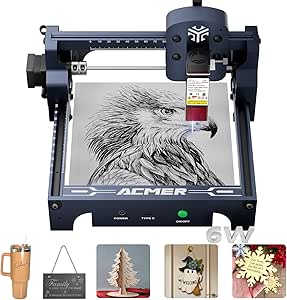 | Best Compact Mid-Power Pick | Laser power: 6000 mW diode laser | Machine output: 48 W | Working area: 130 × 130 mm | VIEW ON AMAZON | See Our Full Breakdown |
| ACMER S1 Laser Engraver and Cutter, 2500 mW |  | Best Entry-Level Compact Pick | Laser power: 2500 mW | Machine output: 24 W | Working area: 130 × 130 mm | VIEW ON AMAZON | See Our Full Breakdown |
| AlgoLaser MK3 8W Laser Engraver for Beginners, Offline Touchscreen Design |  | Best for Large Beginner Projects | Laser power: 8 W | Engraving area: 400 × 400 mm | Display: 3.5-inch touchscreen | VIEW ON AMAZON | See Our Full Breakdown |
| laser engravers for wood craft | Laser power | Working area | Weight |
|---|---|---|---|
| Carverall K15 Pro 10W Laser En | 10W (verified output 10.36–10.58W) | — | — |
| xTool M2 10W Enclosed Laser En | 10W diode laser | — | — |
| Twotrees TTS-55 Pro Laser Engr | 5500 mW | 300 × 300 mm | — |
| ELIDOR Z6 6W Laser Engraver an | 6W (6000 mW) | 300 × 300 mm (11.8 × 11.8 inches) | 4.89 pounds |
| ACMER S2 Laser Engraver | 12W laser module | — | 7.98 pounds |
| ACMER S1 Laser Engraver and Cu | 6000 mW diode laser | 130 × 130 mm | 4.2 lb (2 kg) |
| ACMER S1 Laser Engraver and Cu | 2500 mW | 130 × 130 mm | 3.98 lb |
| AlgoLaser MK3 8W Laser Engrave | 8 W | — | — |
More Details on Our Top Picks
Carverall K15 Pro 10W Laser Engraver and Cutter
The Carverall K15 Pro pairs a 10W diode laser with an A4-sized work area, making it a practical fit for small wood signs, ornaments, and repeat craft batches. Its one-touch focusing and saved-file memory can reduce setup between familiar jobs, while TF card control lets it run without a connected computer. Compared with the ACMER S2, its smaller workspace limits the size of each piece, but its light 2.68 kg frame is easier to move or store. The optional IR head adds a path to bare-metal marking, though that capability requires a separate module. I’d choose it for compact wood projects and flexible software support; buyers planning larger panels should look to a 300 × 300 mm machine instead.
Pros:- Compact 11.8 × 7.9 inch work area suits small craft pieces and storage in a limited workspace.
- TF card control supports offline jobs, and saved-file memory can simplify repeat work.
- One-touch focusing reduces setup effort when changing materials.
- Works with CutLabX, LightBurn, and LaserGRBL.
Cons:- The A4 work area restricts project size compared with the ACMER S2 and Twotrees TTS-55 Pro.
- The IR laser head and expansion accessories are optional, so bare-metal marking requires an additional module.
- The listed one-year warranty may be limiting for long-term workshop use.
Best for: Crafters making small wood ornaments, tags, and repeat designs who want a lightweight machine with offline control.
Not ideal for: Makers working on wide signs or large batches, since the A4 work area is smaller than the 300 × 300 mm ACMER S2 workspace.
- Laser power:10W (verified output 10.36–10.58W)
- Work area:11.8 × 7.9 inches
- Engraving precision:0.01 mm
- Maximum speed:15,000 mm/min
- Cutting capacity:12 mm plywood; 8 mm acrylic
- Offline control:TF card
- Compatible software:CutLabX, LightBurn, LaserGRBL
- Item weight:2.68 kg
Our verdict“Choose the K15 Pro for small, repeatable wood crafts and easy storage; choose a 300 × 300 mm model for larger pieces.”
xTool M2 10W Enclosed Laser Engraver with Dual Cameras
The xTool M2 suits wood crafters who value a contained setup and visual material placement. Its Class 1 enclosure and dual cameras help users preview the work area and position wood pieces, which can be useful when aligning small designs. The included 10W diode handles wood and other craft materials, while templates and an AI image generator offer a guided starting point. Compared with the open-frame ACMER S2, the M2 puts more emphasis on enclosure and camera-assisted setup, but it weighs 36.2 pounds and its package dimensions call for a dedicated spot. Rotary work, full-color printing, and the optional 3W IR laser each require separate modules. I’d pick it for a home craft space where guided placement matters more than portability or a ready-to-use rotary setup.
Pros:- Class 1 enclosure offers a contained configuration for a home craft workspace.
- Dual cameras help preview the work area and place wood blanks more accurately.
- Templates and an AI image generator provide a starting point for designs.
- Supports wood, leather, felt, fabric, and paper.
Cons:- At 36.2 pounds, it is substantially less portable than the Carverall K15 Pro.
- Rotary work, full-color printing, and 3W IR engraving require separately sold modules.
- The listed warranty is one year.
Best for: New wood crafters who want an enclosed machine with camera-assisted placement and built-in design guidance.
Not ideal for: Makers who need a portable engraver or plan to engrave cylindrical objects without purchasing an optional rotary module.
- Laser power:10W diode laser
- Safety class:Class 1
- Cameras:Built-in dual cameras
- Item weight:36.2 pounds
- Package dimensions:28 × 25 × 12 inches
- Model number:MLM-K610-001
- Included items:xTool M2 machine, base material kit
- Warranty:1 year
Our verdict“Choose the M2 if an enclosed, camera-guided setup matters most for your home wood crafts and you can dedicate space to it.”
Twotrees TTS-55 Pro Laser Engraver 5500mW
The Twotrees TTS-55 Pro combines a 300 × 300 mm work area with a stated engraving speed of up to 30,000 mm/min, giving wood crafters room to work on broader pieces and a fast headline speed for simpler jobs. Wi-Fi and TF card support offer different ways to send work, and it supports LightBurn and LaserGRBL. Its stated cutting capacity—5 mm plywood—makes it a better fit for light wood cuts than the Carverall K15 Pro, which lists 12 mm plywood capacity; the Carverall also has a higher laser power rating. So the TTS-55 Pro’s appeal is its larger work area and connectivity, not the strongest cutting spec in this group. The open-frame design also calls for careful safety practices. I’d shortlist it for hobbyists who want a connected 300 mm workspace for engraving and lighter cuts.
Pros:- 300 × 300 mm work area accommodates broader craft pieces than the Carverall K15 Pro.
- Wi-Fi, online control, and TF card support provide flexible job transfer.
- Compatible with LightBurn and LaserGRBL.
- Listed engraving speed reaches up to 30,000 mm/min.
Cons:- Listed cutting capacity is 5 mm plywood, limiting thicker wood cuts compared with the Carverall K15 Pro.
- The open-frame configuration requires careful laser safety handling.
- At 8.23 pounds, it is heavier than the Carverall K15 Pro for moving between work areas.
Best for: Hobbyists making medium-sized wood plaques and craft batches who want Wi-Fi or TF card job transfer.
Not ideal for: Crafters who prioritize cutting thicker plywood, since its listed 5 mm capacity is below the Carverall K15 Pro’s stated 12 mm.
- Laser power:5500 mW
- Working area:300 × 300 mm
- Focus spot size:0.08 × 0.46 mm
- Cutting thickness:5 mm plywood; 3 mm acrylic; 0.7 mm leather
- Engraving speed:Up to 30,000 mm/min
- Control board:32-bit dual-core MCU
- Connectivity:Wi-Fi, online, and TF card support
- Item weight:8.23 pounds
Our verdict“Pick the TTS-55 Pro for a connected 300 mm engraving area and lighter wood cuts, but choose a higher-power option for thicker plywood.”
ELIDOR Z6 6W Laser Engraver and Cutter
For detailed wood artwork across a square 300 × 300 mm bed, the ELIDOR Z6 emphasizes a fine stated spot size of 0.04 × 0.14 mm and accuracy up to 0.01 mm. Those figures suit small lettering and intricate line work, while the broad work area handles larger craft blanks than the Carverall K15 Pro. The tradeoff is its 6W laser and 10,000 mm/min maximum speed: the ACMER S2 lists 12W power, so it is the more compelling choice if cutting capacity is central to the project. The Z6 supports LightBurn and LaserGRBL on Windows, macOS, and Linux, giving it broad software reach. Product dimensions appear incomplete, and the description does not state safety features, so buyers should clarify workspace and protection details before settling on it.
Pros:- Fine stated spot size supports detailed marks on wood craft pieces.
- 300 × 300 mm work area gives more room than the Carverall K15 Pro.
- LightBurn and LaserGRBL support Windows, macOS, and Linux.
- Compact listed weight of 4.89 pounds.
Cons:- Its 6W power and 10,000 mm/min maximum speed are modest beside the 12W ACMER S2.
- The listed product dimensions of 1 × 1 × 1 inches appear incomplete or inaccurate.
- The description does not specify safety features.
Best for: Wood crafters focused on fine lettering and detailed engravings who need a 300 × 300 mm bed and cross-platform software.
Not ideal for: Makers who need a clearly specified machine footprint or documented safety features, or who prioritize higher laser power for cutting.
- Laser power:6W (6000 mW)
- Working area:300 × 300 mm (11.8 × 11.8 inches)
- Engraving accuracy:Up to 0.01 mm
- Laser spot size:0.04 × 0.14 mm
- Maximum speed:10,000 mm/min
- Weight:4.89 pounds
- Compatible software:LaserGRBL, LightBurn
- Supported operating systems:Windows, macOS, Linux
Our verdict“Choose the Z6 for fine wood engraving on a roomy bed if you can confirm its dimensions and safety details before buying.”
ACMER S2 Laser Engraver, 12000mW Laser Cutter Engraving Machine
The ACMER S2 is the higher-power choice in this set: its 12W laser and 300 × 300 mm workspace suit wood crafters who want room for larger pieces and more cutting headroom than the Twotrees TTS-55 Pro, which lists a 5 mm plywood cutting limit. Its 0.08 × 0.08 mm spot size and 0.01 mm positioning accuracy also support detailed engraving rather than forcing a choice between detail and workspace. ACMER Studio, LightBurn, and LaserGRBL give buyers software options across Windows, macOS, and Linux. The tradeoffs are a heavier frame than the ELIDOR Z6 and some assembly and setup work. Safety features are listed, including a UV shield and motion protection, but the product description does not spell out a safety class. I’d favor it for versatile wood projects where cutting power and bed size both matter.
Pros:- 12W laser module provides the highest listed laser power among these five products.
- 300 × 300 mm workspace accommodates larger wood craft blanks.
- 0.08 × 0.08 mm spot size and 0.01 mm positioning accuracy support detailed work.
- Compatible with ACMER Studio, LightBurn, and LaserGRBL across Windows, macOS, and Linux.
Cons:- Some assembly and setup experience is required.
- At 7.98 pounds, it is less convenient to move than the ELIDOR Z6.
- The description lists safety features but does not specify a safety class.
Best for: Woodworkers making larger craft pieces who want a 300 × 300 mm bed, higher listed laser power, and multiple software options.
Not ideal for: Buyers seeking a lightweight, ready-to-run engraver, since it weighs 7.98 pounds and requires some assembly and setup.
- Laser power:12W laser module
- Total system power:72W
- Laser spot size:0.08 × 0.08 mm
- Positioning accuracy:0.01 mm
- Workspace:300 × 300 mm
- Material compatibility:Wood, leather, acrylic, coated metal, and more
- Operating system compatibility:Windows, macOS, Linux
- Weight:7.98 pounds
Our verdict“Choose the ACMER S2 if you want a roomy work area and higher listed power for wood engraving and cutting, and can handle setup.”
ACMER S1 Laser Engraver and Cutter, 6000 mW Diode Laser
The 6W diode gives wood crafters more engraving and thin-sheet cutting headroom than the 2.5W ACMER S1, while keeping the same 130 × 130 mm workspace. That small footprint suits ornaments, tags, and other compact pieces; it will constrain larger signs or batches. A stated speed of up to 10,000 mm/min and 0.01 mm repeatable positioning accuracy support detailed layouts, though speed alone does not establish real-world throughput. Its 99% preassembly and compatibility with LightBurn and LaserGRBL make setup more approachable than a machine that requires extensive assembly. Compared with the larger-workspace AlgoLaser MK3, this S1 is easier to fit on a crowded bench but gives up substantial project area. Cutting is specified for thin plywood, MDF, and acrylic, so I would choose it for small craft work rather than regular cutting of thicker stock.
Pros:- 6W diode offers more output than the 2.5W ACMER S1 for engraving and the specified thin-sheet cutting tasks.
- Compact 130 × 130 mm work area fits small craft projects and limited workspaces.
- 99% preassembled design reduces initial setup work.
- Works with ACMER Studio, LightBurn, and LaserGRBL on macOS, Windows, and Linux.
Cons:- The 130 × 130 mm work area limits project size and batch layout.
- Cutting capability is specified only for thin plywood, MDF, and acrylic.
Best for: Wood crafters with limited bench space who mainly engrave small items and want some thin-sheet cutting capability.
Not ideal for: Makers producing large signs or needing to cut thicker wood, since the 130 × 130 mm area is small and cutting is described only for thin materials.
- Laser power:6000 mW diode laser
- Machine output:48 W
- Working area:130 × 130 mm
- Engraving speed:Up to 10,000 mm/min
- Repeatable positioning accuracy:0.01 mm
- Machine dimensions:250 × 250 × 162 mm
- Weight:4.2 lb (2 kg)
- Compatible software:ACMER Studio, LightBurn, LaserGRBL
- Warranty:12 months
Our verdict“Choose this S1 for compact wood crafts that benefit from more output than the 2.5W version, provided its small work area fits your projects.”
ACMER S1 Laser Engraver and Cutter, 2500 mW
For small wood projects, this 2.5W ACMER S1 keeps the same 130 × 130 mm footprint and stated 0.01 mm repeatable positioning accuracy as the 6W S1, but offers less laser power. That makes it the more modest choice for engraving names, patterns, and small decorations; the 6W sibling is the better fit if cutting thin sheet material is a regular part of your plans. The listed speed reaches 10,000 mm/min, though that maximum does not tell me how quickly a particular wood or design will finish. It arrives 99% preassembled and supports LightBurn and LaserGRBL, giving beginners software options beyond the built-in workflow on the AlgoLaser MK3. Its workspace remains a real constraint, and the cutting claim covers only thin plywood, MDF, and acrylic. I would skip it for large pieces or frequent cutting jobs.
Pros:- Compact, lightweight frame suits small benches and small-format craft projects.
- 99% preassembled design reduces assembly demands for a first machine.
- Supports LightBurn and LaserGRBL as well as Acmerstudio.
- Listed compatibility includes macOS, Windows, and Linux.
Cons:- Lower 2.5W laser power than the 6W ACMER S1 limits its appeal for buyers prioritizing cutting headroom.
- The 130 × 130 mm work area restricts larger designs and batch work.
- Cutting is described only for thin plywood, MDF, and acrylic.
Best for: Beginners making small wood ornaments, tags, or personalized pieces who want a lightweight machine and familiar software options.
Not ideal for: Crafters working on large panels or relying on regular cutting, since the work area is 130 × 130 mm and cutting is limited to thin materials.
- Laser power:2500 mW
- Machine output:24 W
- Working area:130 × 130 mm
- Engraving speed:Up to 10,000 mm/min
- Repeatable positioning accuracy:0.01 mm
- Machine dimensions:250 × 250 × 162 mm
- Weight:3.98 lb
- Software compatibility:Acmerstudio, LightBurn, LaserGRBL
- Warranty:12 months
Our verdict“Pick the 2.5W S1 for small, mostly engraving-focused wood crafts when compact size and software choice matter more than cutting power.”
AlgoLaser MK3 8W Laser Engraver for Beginners, Offline Touchscreen Design
The MK3 is the clear choice in this batch when workspace matters most: its 400 × 400 mm engraving area dwarfs the 130 × 130 mm ACMER S1 machines, leaving room for larger signs and several smaller wood pieces in one layout. A 3.5-inch touchscreen and built-in project library support computer-free crafting, while 95% preassembly cuts down setup effort. Its 8W diode has more listed power than either S1 here, but the supplied information does not establish cutting performance beyond the stated material compatibility, so I would treat it primarily as an engraver. The tradeoff is a narrower software path: offline use runs through AlgoOS, with computer connection optional. Manual focus setup also adds a step that the compact ACMER options may avoid. This suits a beginner who values room and guided operation over broad software flexibility.
Pros:- 400 × 400 mm engraving area accommodates larger pieces than either ACMER S1.
- 3.5-inch touchscreen and built-in project library support computer-free design work.
- 95% preassembled setup lowers the initial assembly burden.
- Listed material compatibility includes wood, leather, acrylic, and stone.
Cons:- Offline software use is limited to AlgoOS unless connected to a computer.
- Manual focus setup adds an adjustment step.
- The 8W specification alone does not establish suitability for hard materials or cutting thicker wood.
Best for: Beginners making larger wood signs or batches of decorations who want a touchscreen workflow and a generous working area.
Not ideal for: Makers who need broad third-party software compatibility or prioritize a very compact machine for a small workbench.
- Laser power:8 W
- Engraving area:400 × 400 mm
- Display:3.5-inch touchscreen
- Preassembly:95% pre-assembled
- Connectivity:Offline with optional computer connection
- Material compatibility:Wood, leather, acrylic, stone
- Offline software:AlgoOS
Our verdict“Choose the MK3 for beginner-friendly engraving on larger wood projects, provided its AlgoOS-centered workflow suits you.”

How We Picked
I ranked these machines for wood-craft fit, looking at stated laser output, the kind of work each feature supports, and how clearly the machine’s workflow matches common craft tasks. Enclosure and camera features matter because they can shape setup and job alignment; offline controls matter for makers who prefer operating at the machine. I also considered whether the product information signals a useful role for engraving, cutting, beginner use, or a more guided setup.
The ranking reflects the balance of those factors, rather than treating maximum wattage as an automatic win. The xTool M2 10W takes the lead for its combination of enclosure, cameras, and 10W output. The Carverall K15 Pro and AlgoLaser MK3 follow for different priorities, while higher and lower power ACMER models, Twotrees, and ELIDOR offer alternatives whose appeal depends on the buyer’s intended projects. Product details supplied for this roundup do not establish comparative test results, so I avoid claiming measured speed, cut depth, or material performance.
Factors to Consider When Choosing Laser Engravers For Wood Crafts
Before choosing a machine, I’d work backward from the pieces I want to make, the space where I’ll use it, and how I prefer to prepare jobs. These decisions can matter more than a small difference in stated power.
Choose Around Your Most Common Wood Project
Start by listing the objects you expect to make most often: small ornaments, engraved signs, layered decorations, or cut shapes. Fine surface engraving and cutting through stock place different demands on a machine, so a single wattage figure cannot answer both questions. Check the product’s stated capabilities and material guidance against the thickness and wood types you plan to use. A common mistake is buying for an occasional ambitious cut when most projects are shallow engravings. If cutting is central to your work, look for clear guidance on supported materials and thickness, then plan to confirm settings with scrap. If engraving is the main job, prioritize reliable alignment and a work area that fits your pieces.
Treat Power as One Part of the Decision
Higher stated laser output can be relevant when a project involves cutting, but it does not guarantee a particular result across different woods. Grain, finish, color, thickness, and focus all affect how a laser marks a piece. Compare machine specifications alongside the maker’s material guidance instead of assuming that the highest number will handle every craft task. Lower output may still fit a buyer focused on small engraved details and lighter work. The tradeoff is that pushing a lower-powered machine toward frequent cuts can mean more passes and more time. Decide whether cutting is an occasional bonus or a regular part of your workflow before paying for added output.
Plan for Safety and Ventilation
Laser work calls for a deliberate setup, including supervision, eye protection appropriate to the machine, and a plan for smoke and fumes. An enclosure can help contain the work area, but buyers should read what it includes and follow the manufacturer’s safety instructions. An open-frame machine may need more attention to its location and surrounding workspace. Wood smoke and residue can affect both comfort and cleanliness, so consider where extraction or ventilation can be arranged. Do not assume an enclosure removes every hazard or makes unattended operation appropriate. A safe workspace is part of the purchase decision, especially in a shared room or small craft area.
Match the Workflow to Your Comfort With Software
Think about how you want to prepare and position each design. Camera features can help with placement, while an offline touchscreen can reduce reliance on a computer during operation. Those features solve different workflow problems, so decide whether you value visual alignment, controls at the machine, or a familiar desktop process. Before buying, check supported software, file types, device compatibility, and whether the workflow requires an ongoing computer connection. A frequent mistake is focusing on the machine’s laser and overlooking the time spent importing, positioning, and adjusting designs. If you are new to laser crafting, a workflow that feels clear can save more frustration than a modest increase in output.
Measure the Work Area and Your Materials
Confirm the usable work area against the largest board or item you expect to engrave, including room to position it safely. A machine that fits a desk may still be awkward if its frame, enclosure, or material handling needs extra clearance. Also consider whether your crafts are flat and uniform or include small pieces that need repeatable placement. Check how the machine accommodates material and whether accessories needed for your work are included or separate. Do not infer workspace size from a model name or product photo. Measuring your materials before purchase helps prevent a setup that can engrave only smaller versions of your planned designs.
Decide What You Will Maintain
Laser craft work creates residue, and keeping the lens, work surface, and moving parts clean supports consistent operation. Read the maker’s maintenance instructions and check whether replacement or consumable parts are readily identified. Buyers sometimes compare machines only by purchase features, then discover that routine cleaning or setup takes more attention than they expected. If you plan to engrave often, account for the time needed to clean the machine and manage smoke residue. A simpler routine may suit a hobby maker who works occasionally, while frequent projects reward a setup that is easy to inspect and maintain. Factor maintenance into the space and time you can give the machine.
Frequently Asked Questions
Is a 10W engraver a better choice than a 6W or 8W model for wood crafts?
Not automatically. Stated output is one factor, and the right choice depends on whether your projects are mostly surface engraving or include regular cutting. Wood type, thickness, focus, and settings all affect results, so compare each machine’s guidance for the materials you intend to use. A lower-output model may suit light engraving, while more output may better match buyers who expect to cut more often. I would choose based on the actual project mix rather than the wattage label alone.
Should I choose an enclosed engraver if I work in a small room?
An enclosure can help contain the work area, which is useful in a shared craft space, but it does not by itself address every safety or ventilation need. Check the manufacturer’s instructions for eye protection, smoke extraction, and operating conditions. Make sure the enclosure and machine fit with enough clearance for materials and maintenance. If you cannot arrange suitable ventilation, reconsider where and how you will operate any laser engraver. Room size is only one part of a safe setup.
Can a beginner start with a machine that has more laser power?
A beginner can choose a higher-output machine, but extra power does not replace learning focus, material behavior, and safe operation. It may be useful if cutting is part of the intended craft work, while a guided workflow or clear controls can matter more during early projects. Start with material recommendations and practice on scrap to learn how settings affect each wood. Avoid choosing solely by the largest output figure if your first projects are small engravings. Match capability to the work you expect to do after the learning stage as well.
What should I check before buying an engraver for plywood crafts?
Check the machine’s material guidance for the specific plywood type and thickness you plan to use. Adhesives and surface finishes can change how plywood behaves under a laser, so do not assume results transfer from one board to another. Confirm that the usable work area fits your panels and that your workspace supports smoke handling. Use scrap from the same material to establish settings before working on a finished piece. If cutting is important, look for explicit supported-thickness guidance rather than relying on a general power claim.
Is an offline touchscreen or a camera more useful for wood craft projects?
They address different needs. A touchscreen can let you control jobs at the machine without relying as heavily on a computer, while cameras can help with positioning designs on a workpiece. If you make repeat pieces and want alignment help, camera functionality may be valuable; if you prefer a self-contained operating workflow, offline controls may be a better fit. Check which software and file workflow each feature supports before deciding. Neither feature substitutes for confirming material placement and settings before a job starts.
Conclusion
For a balanced mix of guided setup and wood-craft capability, I recommend the xTool M2 10W as best overall. The Carverall K15 Pro 10W is a strong alternative for buyers who want 10W output without the xTool’s camera-led distinction, while the ACMER S2 12W is my pick for buyers prioritizing the highest stated output in this group. Beginners who value controls at the machine should look at the AlgoLaser MK3 8W; those focused on lighter engraving can compare the ACMER S1 2.5W and Twotrees TTS-55 Pro. I’d choose the ELIDOR Z6 6W or ACMER S1 6W by checking their workflow and workspace fit against the projects at hand. The best match is the one whose power, setup, and operating style line up with the wood pieces you actually plan to make.
Halloween Picks
halloween
As an affiliate, we earn on qualifying purchases.