For wood engraving and light cutting, I would start with the xTool S1 40W as the premium pick, while the Laser Tree 20W stands out for its unusually large work area and the Algolaser 10W for its touchscreen and included rotary roller. The main choice is between a compact diode machine for small projects and a higher power or enclosed model for faster work, thicker stock, or more controlled operation. Work area, air assistance, setup, and material thickness can matter as much as the wattage printed on the product. I compare all 15 options below so you can match a machine to your wood projects and workspace.

Get business pricing on tools and workshop supplies
- Business-only prices and quantity discounts
- Tax-exempt purchasing
- Multiple users, one account, clear invoices
Complete the kit



Key Takeaways
- The xTool S1 40W is the power pick in this lineup, suited to buyers who want more cutting headroom and are prepared for a larger, more involved setup.
- The Laser Tree 20W prioritizes sheet size with a 15.75 x 31.50 inch work area, which may suit long or oversized pieces better than a compact machine.
- Most ACMER S1 options trade work area for compactness, with listed working areas of 130 x 130 mm on several models; check the exact wattage before choosing among them.
- The xTool M2 models emphasize an enclosed workflow; the dual-camera version and the CMYK inkjet version offer different extras, so match the configuration to the task.
- Wattage alone does not settle the ranking: work area, enclosure, air assistance, included accessories, and ease of setup change how useful each machine is for wood.
| ELIDOR Z6 6W Laser Engraver and Cutter |  | Best for a Large Work Area on a Compact Frame | Laser power: 6W (6000mW) | Working area: 300 × 300 mm (11.8 × 11.8 in) | Laser spot size: 0.04 × 0.14 mm | VIEW ON AMAZON | See Our Full Breakdown |
| Algolaser 10W Laser Engraver Machine with Touchscreen, Rotary Roller & Riser |  | Best for Hands-On, Standalone Control | Laser power: 10W | Engraving speed: Up to 12,000 mm/min | Touchscreen: 3.5 inches | VIEW ON AMAZON | See Our Full Breakdown |
| ACMER S1 Laser Engraver and Cutter, 6000 mW | 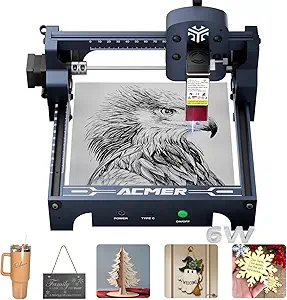 | Best Compact Starter for Thin Wood | Laser power: 6000 mW | Machine output: 48 W | Wavelength: 455 ± 5 nm | VIEW ON AMAZON | See Our Full Breakdown |
| Twotrees TTS-55 Pro 5.5W Laser Engraver |  | Best for Air-Assisted Wood Cuts | Laser power: 5.5 W | Laser class: Class II | Working area: 300 × 300 mm | VIEW ON AMAZON | See Our Full Breakdown |
| ACMER S1 Laser Engraver 3500mW with 130x130mm Working Area |  | Best for Fine Detail on Small Wood Pieces | Laser power: 3500 mW | Wavelength: 455 ± 5 nm | Focal length: 2 mm | VIEW ON AMAZON | See Our Full Breakdown |
| Laser Tree 20W Laser Engraver and Cutter Machine with Air Assistance, 15.75 x 31.50 Inch Large Working Area |  | Best for Large Wood Projects | Laser power: 20W | Working area: 15.75 × 31.50 inches (400 × 800 mm) | Maximum engraving speed: 10,000 mm/min | VIEW ON AMAZON | See Our Full Breakdown |
| ACMER S1 Laser Engraver for Beginners, 6000mW Laser Cutter with 130x130mm Working Area |  | Best for Small, Detailed Engravings | Laser power: 6000 mW | Working area: 130 × 130 mm | Wavelength: 455 ± 5 nm | VIEW ON AMAZON | See Our Full Breakdown |
| xTool M2 10W Enclosed Laser Engraver with Dual Cameras |  | Best Enclosed Choice for Beginners | Laser power: 10W diode | Safety class: Class 1 | Enclosure: Fully enclosed | VIEW ON AMAZON | See Our Full Breakdown |
| Carverall K15 Pro 10W Laser Engraver and Cutter |  | Best for Flexible, Repeat Craft Jobs | Laser type: 10W diode laser | Output power: 10.36–10.58W | Work area: 11.8 × 7.9 inches | VIEW ON AMAZON | See Our Full Breakdown |
| xTool M2 10W Laser Engraver with CMYK Inkjet Printer |  | Best for Full-Color Wood Crafts | Laser power: 10W diode | Printer: CMYK inkjet module included | Cameras: Dual built-in cameras | VIEW ON AMAZON | See Our Full Breakdown |
| Twotrees TTS-10 Pro Laser Engraver |  | Best for Detailed Mid-Size Wood Projects | Laser power: 10W | Work area: 300 × 300 mm | Laser spot size: 0.069 mm | VIEW ON AMAZON | See Our Full Breakdown |
| ACMER S2 12W Laser Engraver and Cutter |  | Best Value for Multi-Material Wood Cutting | Laser module power: 12 W | Total system power: 72 W | Working area: 300 × 300 mm | VIEW ON AMAZON | See Our Full Breakdown |
| xTool S1 40W Laser Cutter and Engraver with Rotary Bundle |  | Best Premium Enclosed Wood Cutter | Laser power: 40W | Work area: 23.93 × 15.16 inches | Maximum engraving speed: 600 mm/s | VIEW ON AMAZON | See Our Full Breakdown |
| ORTUR Laser Master 2 S2 LU2-10A 10W Laser Engraver and Cutter |  | Best Large Open-Frame Work Area | Laser power: 10W (10,000 mW) | Engraving area: 390 × 410 mm | Compressed laser spot: 0.05 × 0.1 mm | VIEW ON AMAZON | See Our Full Breakdown |
| ACMER S1 Laser Engraver and Cutter, 2500 mW Diode Laser |  | Best Compact Starter for Small Wood Pieces | Laser power: 2500 mW | Machine output: 24 W | Wavelength: 455 ± 5 nm | VIEW ON AMAZON | See Our Full Breakdown |
| laser cutter for wood | Laser power | Working area |
|---|---|---|
| ELIDOR Z6 6W Laser Engraver an | 6W (6000mW) | 300 × 300 mm (11.8 × 11.8 in) |
| Algolaser 10W Laser Engraver M | 10W | — |
| ACMER S1 Laser Engraver and Cu | 6000 mW | 130 × 130 mm |
| Twotrees TTS-55 Pro 5.5W Laser | 5.5 W | 300 × 300 mm |
| ACMER S1 Laser Engraver 3500mW | 3500 mW | 130 × 130 mm |
| Laser Tree 20W Laser Engraver | 20W | 15.75 × 31.50 inches (400 × 800 mm) |
| ACMER S1 Laser Engraver for Be | 6000 mW | 130 × 130 mm |
| xTool M2 10W Enclosed Laser En | 10W diode | — |
| Carverall K15 Pro 10W Laser En | — | — |
| xTool M2 10W Laser Engraver wi | 10W diode | — |
| Twotrees TTS-10 Pro Laser Engr | 10W | — |
| ACMER S2 12W Laser Engraver an | — | 300 × 300 mm |
| xTool S1 40W Laser Cutter and | 40W | — |
| ORTUR Laser Master 2 S2 LU2-10 | 10W (10,000 mW) | — |
| ACMER S1 Laser Engraver and Cu | 2500 mW | 130 × 130 mm |
More Details on Our Top Picks
ELIDOR Z6 6W Laser Engraver and Cutter
The ELIDOR Z6 pairs a 300 × 300 mm work area with a lightweight 4.89 lb frame, giving woodworkers room for larger panels or multiple small pieces without choosing a bulkier machine. Its 6W laser and listed 0.01 mm accuracy suit detailed engraving and light cutting, though the data does not specify wood cutting thickness. Compared with the ACMER S1 6000 mW, it offers more than five times the working area, while the ACMER is smaller and nearly preassembled. The Z6 also supports LightBurn and LaserGRBL across Windows, macOS, and Linux, which makes it flexible to fit into an existing workflow. Its tradeoff is modest laser power for cutting wood, and the supplied product dimensions appear unreliable, so I would verify the physical footprint before planning a permanent setup.
Pros:- 300 × 300 mm work area accommodates larger wood pieces than the 130 × 130 mm ACMER S1 models
- Supports LightBurn and LaserGRBL on Windows, macOS, and Linux
- Compact 4.89 lb listed weight
- Listed engraving accuracy reaches 0.01 mm
Cons:- 6W laser power is a limited choice for cutting thicker wood
- No wood cutting thickness is specified
- Listed product dimensions of 1 × 1 × 1 inches appear inaccurate
Best for: Wood hobbyists engraving signs, panels, or batches of small pieces who need a broad work area and cross-platform software support.
Not ideal for: Buyers focused on cutting thick wood or those who need verified machine dimensions before choosing a tightly fitted workspace.
- Laser power:6W (6000mW)
- Working area:300 × 300 mm (11.8 × 11.8 in)
- Laser spot size:0.04 × 0.14 mm
- Engraving accuracy:Up to 0.01 mm
- Maximum speed:10,000 mm/min
- Weight:4.89 lbs
- Compatible software:LaserGRBL, LightBurn
- Supported operating systems:Windows, macOS, Linux
Our verdict“Choose the Z6 for a lightweight engraver with a roomy bed, provided your wood projects do not depend on deep cuts.”
Algolaser 10W Laser Engraver Machine with Touchscreen, Rotary Roller & Riser
The Algolaser’s 3.5-inch touchscreen and Wi-Fi, USB, TF card, and app connections make it the most self-contained control setup in this group. For wood projects, its 10W laser offers more cutting headroom than the 5.5W Twotrees TTS-55 Pro, while the included riser and rotary roller let owners switch from flat wood pieces to taller or cylindrical work. The listed speed reaches 12,000 mm/min, but speed alone does not establish how thick a board it can cut; that capacity is not provided here. The touchscreen may make routine jobs easier to run without relying on a computer, though setup and calibration still take care. This is a flexible option for a hobbyist or small shop with varied projects, but a buyer seeking verified wood thickness limits should compare specifications before committing.
Pros:- 3.5-inch touchscreen offers direct machine control
- Includes a rotary roller and riser for cylindrical and thicker workpieces
- Wi-Fi, USB, TF card, and app connectivity provide several job-transfer options
- 10W laser power exceeds the 5.5W Twotrees TTS-55 Pro
Cons:- No specific wood cutting thickness is provided
- Requires setup and calibration before consistent work
- Safety features still require attentive handling during operation
Best for: Small-shop makers and hobbyists who want touchscreen operation and plan to engrave both flat wood and cylindrical or raised objects.
Not ideal for: Woodworkers whose main requirement is cutting thick stock, since no wood cutting capacity is listed.
- Laser power:10W
- Engraving speed:Up to 12,000 mm/min
- Touchscreen:3.5 inches
- Connectivity:Wi-Fi, USB, TF card, app
- Included accessories:Rotary roller and riser
- Safety features:Class 1 safety design, flame detection, emergency stop
- Warranty:1 year
Our verdict“Pick the Algolaser if touchscreen control and included rotary and riser accessories matter more than documented wood cutting capacity.”
ACMER S1 Laser Engraver and Cutter, 6000 mW
With a 130 × 130 mm work area and 99% preassembly, the ACMER S1 6W is aimed at small wood projects where a quick setup and compact footprint matter more than sheet capacity. Its 0.01 mm repeatable positioning accuracy supports detailed designs, and it can cut thin plywood and MDF, though the description gives no thickness figure. Compared with the ELIDOR Z6, the ACMER takes up less space and arrives largely assembled, but its bed is much smaller than the Z6’s 300 × 300 mm area. It also supports LightBurn and LaserGRBL on macOS, Windows, and Linux. That software flexibility does not change its central limit: this is a machine for small pieces and light cuts, not full-size panels or demanding wood fabrication. Class 4 classification calls for careful operation.
Pros:- 99% preassembled for a quicker initial setup
- Compact 2 kg machine with a 130 × 130 mm footprint
- 0.01 mm repeatable positioning accuracy
- Works with ACMER Studio, LightBurn, and LaserGRBL across major operating systems
Cons:- 130 × 130 mm work area limits project size
- Cutting is specified only for thin plywood, MDF, and acrylic
- Class 4 laser requires careful handling
Best for: Beginners with limited bench space who want to engrave small wood pieces and try cutting thin plywood or MDF.
Not ideal for: Makers working on large signs, full-size panels, or thicker wood that needs repeated cutting passes.
- Laser power:6000 mW
- Machine output:48 W
- Wavelength:455 ± 5 nm
- Working area:130 × 130 mm
- Maximum engraving speed:10,000 mm/min
- Repeatable positioning accuracy:0.01 mm
- Weight:2 kg
- Compatible software:ACMER Studio, LightBurn, LaserGRBL
- Laser classification:Class 4
Our verdict“Choose this ACMER S1 for small, detailed wood projects and thin cuts when a compact, mostly assembled machine suits your workspace.”
Twotrees TTS-55 Pro 5.5W Laser Engraver
The Twotrees TTS-55 Pro earns its place through air-assist support and a listed capacity of up to 5 mm plywood, giving it a clearer wood-cutting brief than the ELIDOR Z6, whose cutting thickness is unspecified. Its 300 × 300 mm bed also suits broader layouts than the compact ACMER S1 machines. The tradeoff is a 5.5W laser: the listed cut limit is thin stock, so it is better for lightweight craft parts than substantial wood components. A red laser shield, Wi-Fi, and TF-card offline engraving add practical convenience, and the machine supports LightBurn across Windows, macOS, and Linux. LaserGRBL compatibility is listed for Windows only. Its listed 0.1 mm accuracy is less precise than the 0.01 mm figures on the ACMER models, so fine detail may favor those alternatives.
Pros:- Air-assist support helps produce cleaner cuts
- 300 × 300 mm work area fits larger layouts than the ACMER S1 machines
- Lists a cutting capacity of 5 mm plywood
- Wi-Fi and TF card support offline engraving
Cons:- 5.5W power and listed cutting capacity limit it to relatively thin wood
- Listed engraving accuracy is up to 0.1 mm, less precise than the ACMER S1 figures
- LaserGRBL compatibility is listed for Windows only
Best for: Wood crafters cutting thin plywood pieces who want air assist, a large bed, and offline job control.
Not ideal for: Buyers cutting thicker wood or users who need listed LaserGRBL support on macOS or Linux.
- Laser power:5.5 W
- Laser class:Class II
- Working area:300 × 300 mm
- Spot focus:0.08 × 0.46 mm
- Engraving accuracy:Up to 0.1 mm
- Maximum engraving speed:30,000 mm/min
- Cutting capacity:5 mm plywood, 3 mm acrylic, 0.7 mm leather
- Connectivity:Wi-Fi, TF card offline engraving
- Compatible software:LaserGRBL, LightBurn
Our verdict“Choose the TTS-55 Pro if air-assisted cuts in thin plywood and a spacious bed matter more than higher power or finer listed accuracy.”
ACMER S1 Laser Engraver 3500mW with 130x130mm Working Area
The 3.5W ACMER S1 is the low-power choice for small, detailed wood engravings. Its listed 0.01 mm repeatability and 130 × 130 mm work area suit tags, ornaments, and compact designs, while its 2 kg frame is easy to place on a small bench. Compared with the 6W ACMER S1 in this lineup, it has less laser power and less evidence for cutting; the 6W version specifically describes cutting thin plywood and MDF. Both share the same small work area and support LightBurn and LaserGRBL. The listed 10,000 mm/min speed does not make up for the lower power when cutting thicker wood, and the product data gives no wood thickness capacity. Class 4 certification also means careful handling is part of the setup.
Pros:- 0.01 mm listed repeatability suits detailed engraving
- Compact 130 × 130 mm work area and 2 kg weight
- Supports LightBurn and LaserGRBL
- Accepts NC, DXF, BMP, JPG, and PNG files
Cons:- 3.5W laser has limited headroom for wood cutting
- Small working area excludes larger projects
- No wood cutting thickness is specified and Class 4 handling requires care
Best for: Hobbyists engraving small wood tags, ornaments, and fine designs who value a compact machine over cutting strength.
Not ideal for: Woodworkers who need to cut plywood or MDF regularly, work on larger pieces, or want a specified cutting capacity.
- Laser power:3500 mW
- Wavelength:455 ± 5 nm
- Focal length:2 mm
- Working area:130 × 130 mm
- Maximum speed:10,000 mm/min
- Repeatability:0.01 mm
- Weight:2 kg
- Supported software:LightBurn, LaserGRBL
- Laser certification:Class 4, IEC 60825-1
Our verdict“Pick the 3.5W ACMER S1 for compact, detail-focused wood engraving, and choose its 6W sibling if thin wood cutting is a priority.”
Laser Tree 20W Laser Engraver and Cutter Machine with Air Assistance, 15.75 x 31.50 Inch Large Working Area
The Laser Tree’s 400 × 800 mm work area is its defining advantage: it can handle long panels and batches of smaller wood pieces that would need repositioning on the compact ACMER S1. Its 20W laser and air assistance are aimed at cutting and engraving work, while the stated maximum speed of 10,000 mm/min can help move through repeat jobs. LightBurn and LaserGRBL support give buyers familiar control options. The tradeoff is the space this open-frame format demands, along with initial setup and calibration. The Class 4 laser also calls for careful safety practices. Choose it for larger wood layouts; skip it if a small desktop footprint or an enclosed Class 1 setup like the xTool M2 matters more.
Pros:- Large 400 × 800 mm work area accommodates long pieces and batch layouts.
- 20W laser power is suited to cutting and engraving wood projects.
- Air assistance supports cleaner cutting work.
- Works with LightBurn and LaserGRBL and accepts common image and vector formats.
Cons:- Requires setup and calibration before it is ready for consistent work.
- Class 4 laser requires careful safety precautions.
- Large working area takes more workspace and is aimed at hobbyist or small-scale commercial use.
Best for: Woodworkers and small makers who need a long work area for panels, signs, or batches of small parts.
Not ideal for: Apartment hobbyists or buyers who prioritize a compact enclosed machine and a simpler safety setup.
- Laser power:20W
- Working area:15.75 × 31.50 inches (400 × 800 mm)
- Maximum engraving speed:10,000 mm/min
- Supported materials:Wood, acrylic, leather, fabric, cardboard, anodized aluminum, and coated metal
- Software:LightBurn and LaserGRBL
- Supported formats:SVG, DXF, BMP, JPG, and PNG
Our verdict“Pick the Laser Tree if long wood pieces and batch work matter more than a compact footprint or enclosed design.”
ACMER S1 Laser Engraver for Beginners, 6000mW Laser Cutter with 130x130mm Working Area
For wood projects where fine detail matters more than cutting area, the ACMER S1’s listed 0.04 mm spot size and 6W diode are a better fit than the larger-format Laser Tree 20W. Its 130 × 130 mm bed keeps the machine portable and suits tags, ornaments, and small personalized pieces, but it rules out larger signs without repositioning. The preassembled design can reduce setup effort, though the product notes a learning curve for complete beginners. Its listed 10,000 mm/min speed does not change the basic limitation: this is a small-format engraver, not a choice for broad wood panels or substantial cutting jobs. Buyers who want an enclosure and camera-assisted placement may prefer the xTool M2, while this ACMER suits simpler, compact projects.
Pros:- 0.04 mm spot size is suited to detailed engraving.
- Compact 130 × 130 mm working area makes the machine portable.
- Preassembled design can simplify initial setup.
- Supports wood, leather, and acrylic.
Cons:- Small bed limits project size and batch capacity.
- Class 4 laser requires careful handling and safety precautions.
- Complete beginners may still face a learning curve.
Best for: Hobbyists making small wooden tags, ornaments, or personalized gifts who value portability and fine engraving detail.
Not ideal for: Woodworkers cutting large panels or needing a larger bed for signs and batch production.
- Laser power:6000 mW
- Working area:130 × 130 mm
- Wavelength:455 ± 5 nm
- Laser spot size:0.04 mm
- Focal length:2 mm
- Maximum speed:10,000 mm/min
- Weight:2 kg
- Supported files:NC, DXF, BMP, JPG, and PNG
- Laser classification:Class 4; IEC 60825-1
Our verdict“Choose this ACMER for small, detail-focused wood engraving when portability matters more than work area.”
xTool M2 10W Enclosed Laser Engraver with Dual Cameras
The xTool M2 stands apart from open-frame options such as the Carverall K15 Pro through its fully enclosed Class 1 design and dual cameras. For wood crafts, the cameras help preview placement before a job, which can reduce mistakes on positioned pieces; the enclosure also gives the workspace a more contained setup. Its 10W diode handles engraving and cutting across wood and other craft materials, while xTool Studio’s templates can help newcomers get started. The tradeoff is that the work area is not specified here, and several capabilities depend on separately purchased modules. Unlike the CMYK bundle version of the M2, this listing does not include the inkjet printer, so it makes more sense for laser-focused craft work than color printing.
Pros:- Fully enclosed Class 1 design contains the laser workspace.
- Dual cameras support workspace previews and placement.
- 10W diode works across wood and many craft materials.
- xTool Studio includes templates and an AI image generator.
Cons:- CMYK inkjet, rotary, and 3W IR modules are optional purchases.
- Full-color printing and fine metal or plastic engraving require add-on modules.
- Working area dimensions are not provided in the supplied product data.
Best for: Newer crafters who want an enclosed wood engraving workspace with camera-assisted placement and guided software.
Not ideal for: Buyers who need a stated large work area, included color printing, or bare-metal engraving without optional modules.
- Laser power:10W diode
- Safety class:Class 1
- Enclosure:Fully enclosed
- Cameras:Dual built-in cameras
- Compatible materials:300+ materials, including cardstock, felt, leather, wood, fabric, and paper
- Software:xTool Studio with templates and an AI image generator
- Optional add-ons:CMYK Inkjet module, RA3 Lite Rotary, and 3W IR laser
Our verdict“Pick this M2 for enclosed, camera-assisted wood crafting if you do not need the included color printer in the other M2 bundle.”
Carverall K15 Pro 10W Laser Engraver and Cutter
The K15 Pro focuses on convenient repeat work: one-touch focus, wireless app control, and offline jobs from a TF card offer more ways to run projects than the small ACMER S1. Its 11.8 × 7.9-inch bed fits many wood crafts, and the listed cutting capacity of up to 12 mm plywood gives buyers a concrete guide for choosing stock. The 10W diode and 15,000 mm/min maximum speed suit varied hobby and small-business jobs, though actual results depend on material and settings. The compact bed remains a constraint for larger signs, and bare-metal engraving needs the optional IR head. Compared with the enclosed xTool M2, the K15 Pro trades an enclosure and camera previews for flexible app and offline controls.
Pros:- Wireless app control and offline TF card operation support flexible workflows.
- One-touch focus and saved-file memory simplify repeat jobs.
- Listed cutting capacity reaches up to 12 mm plywood.
- LightBurn and LaserGRBL compatibility supports familiar software choices.
Cons:- 11.8 × 7.9-inch work area limits larger projects.
- Bare-metal engraving requires the optional 1W IR laser head.
- The product data does not describe an enclosure or camera placement system.
Best for: Makers producing repeat wood crafts who want wireless control, saved offline jobs, and a defined plywood cutting capacity.
Not ideal for: Buyers working on wide wood panels or those who need enclosed operation and camera-assisted placement.
- Laser type:10W diode laser
- Output power:10.36–10.58W
- Work area:11.8 × 7.9 inches
- Precision:0.01 mm
- Maximum speed:15,000 mm/min
- Cutting capacity:Up to 12 mm plywood and 8 mm acrylic
- Control options:Wireless app control and offline TF card operation
- Compatible software:LightBurn and LaserGRBL
- Cooling:Dual-fan laser module
Our verdict“Choose the K15 Pro for repeat wood crafts and flexible job control if its compact bed fits your projects.”
xTool M2 10W Laser Engraver with CMYK Inkjet Printer
This M2 bundle adds a CMYK inkjet module to the enclosed 10W laser platform, making it the pick for crafters who want printed color alongside wood engraving and cutting. Its dual cameras help preview the work area and place designs, while xTool Studio templates can ease project setup. Compared with the other xTool M2 in this lineup, this package includes the printer and a Deluxe Material Kit; the other listing instead leaves the inkjet module as an add-on. That expanded workflow comes with a substantial 43.3-pound machine and a large package, so it is less suited to buyers short on bench space. The optional 3W IR module remains separate, and the 10W diode keeps this focused on craft materials rather than heavier wood production.
Pros:- Includes a CMYK inkjet module for full-color printing alongside laser work.
- Enclosed Class 1 design contains the laser workspace.
- Dual cameras support previews and placement.
- Deluxe Material Kit is included, along with template-based xTool Studio software.
Cons:- 43.3-pound weight and package size make it less convenient to move or store.
- Optional 3W IR module is sold separately.
- 10W diode is a craft-oriented setup rather than a higher-power wood production machine.
Best for: Craft sellers and hobbyists combining wood engraving with full-color printed designs on compatible craft materials.
Not ideal for: Woodworkers with limited bench space or those focused on cutting larger, thicker stock rather than mixed craft work.
- Laser power:10W diode
- Printer:CMYK inkjet module included
- Cameras:Dual built-in cameras
- Safety class:Class 1 enclosed design
- Compatible materials:300+ materials, including wood, leather, felt, fabric, and paper
- Optional module:3W IR laser, sold separately
- Included accessories:Deluxe Material Kit
- Weight:43.3 pounds
- Warranty:1 year
Our verdict“Choose this M2 bundle if full-color printing is part of your wood craft workflow and you have room for a heavier enclosed machine.”
Twotrees TTS-10 Pro Laser Engraver
The Twotrees TTS-10 Pro combines a 10W laser with a 300 × 300 mm work area, giving woodworkers room for signs and panels while keeping a compact open-frame setup. Its 0.069 mm spot size favors fine engraving details; compared with the wider-bed ORTUR Laser Master 2, it trades workspace for a smaller stated spot. The aluminum-alloy frame and TF-card offline engraving offer flexibility for hobbyists who want to run jobs without keeping a computer connected. The tradeoff is setup: this machine assumes some familiarity with engraving software and alignment. Its stated material range includes coated metal, acrylic, leather, and glass, but bare steel is outside its direct capability, and the open frame calls for careful attention to laser safety.
Pros:- 10W optical laser for engraving wood and other listed materials
- 300 × 300 mm work area accommodates mid-size projects
- 0.069 mm laser spot supports fine detail
- TF-card offline engraving and LightBurn or LaserGRBL support
Cons:- Requires technical knowledge for setup and operation
- Bare steel needs surface preparation and is not directly engravable
- Open-frame design requires careful laser safety practices
Best for: Hobbyists and small makers who want detailed wood engraving across a 300 × 300 mm bed and can handle a technical setup.
Not ideal for: Beginners seeking a fully enclosed, low-setup machine or woodworkers needing a larger bed than 300 × 300 mm.
- Laser power:10W
- Work area:300 × 300 mm
- Laser spot size:0.069 mm
- Maximum speed:30,000 mm/min
- Frame material:Aluminum alloy
- Main board:32-bit dual-core MCU
- Software compatibility:LightBurn and LaserGRBL
Our verdict“Choose the TTS-10 Pro for detailed woodwork on a practical mid-size bed if you are comfortable configuring an open-frame engraver.”
ACMER S2 12W Laser Engraver and Cutter
For buyers who want to cut wood as well as engrave it, the ACMER S2 brings a 12W laser and a stated capacity of up to 15 mm paulownia wood with multiple passes. That gives it a cutting-focused edge over the Twotrees TTS-10 Pro, whose supplied details emphasize engraving power and a fine spot rather than a wood thickness figure. Both offer a 300 × 300 mm bed, so neither is the pick for oversized panels. The S2 also works with ACMER Studio, LightBurn, and LaserGRBL across Windows, macOS, and Linux, and its shield, goggles, and motion protection add practical safety provisions. Thick cuts still need repeated passes, while air assist, risers, and rotary modules are optional additions.
Pros:- 12W laser with stated multi-pass cutting capacity up to 15 mm paulownia
- 300 × 300 mm workspace suits many small and medium projects
- Compatible with three engraving software options and major desktop operating systems
- Includes an anti-UV shield, safety goggles, and motion protection
Cons:- Thicker wood cuts require multiple passes
- Air assist, risers, and rotary modules are optional accessories
- The 300 × 300 mm bed limits larger sheet projects
Best for: Makers cutting and engraving small to medium wood pieces who want software choice and included basic safety accessories.
Not ideal for: Woodworkers who need fast single-pass cuts through thick stock or a larger work area than 300 × 300 mm.
- Laser module power:12 W
- Total system power:72 W
- Working area:300 × 300 mm
- Laser spot size:0.08 × 0.08 mm
- Positioning accuracy:Up to 0.01 mm
- Cutting capacity:Up to 15 mm paulownia wood with multiple passes
- Compatible software:ACMER Studio, LightBurn, LaserGRBL
- Operating systems:Windows, macOS, Linux
- Safety features:Anti-UV protective shield, safety goggles, motion protection
Our verdict“Pick the ACMER S2 if wood cutting and broad software compatibility matter more than a larger bed or single-pass speed.”
xTool S1 40W Laser Cutter and Engraver with Rotary Bundle
The xTool S1 is the strongest fit here for buyers who want substantial wood-cutting capacity alongside an enclosed machine. Its 40W laser is stated to cut up to 18 mm cherry wood in a single pass, a much more ambitious cut than the multi-pass capacity listed for the ACMER S2. The 23.93 × 15.16-inch work area also handles broad pieces, and its 118-inch passthrough supports long stock that would not fit inside the bed. Autofocus and creative software can reduce setup friction, while the Class 1 enclosure, flame sensors, and lid-open stop add protection. This is a larger, feature-heavy choice; the provided bundle details do not specify which rotary components are included.
Pros:- 40W laser with stated single-pass cutting up to 18 mm cherry wood
- Large work area accommodates wider wood pieces
- 118-inch passthrough supports long stock
- Enclosed Class 1 design includes flame sensors and a lid-open stop
Cons:- Larger footprint and extensive features may be unnecessary for small projects
- Rotary bundle components are not specified in the supplied product details
- The cutting-thickness claim is specific to cherry wood and may not transfer to other woods
Best for: Woodworkers and small production shops cutting larger or thicker pieces who want an enclosed machine with passthrough capability.
Not ideal for: Beginners with limited workspace, occasional small engraving jobs, or buyers who need clearly specified rotary bundle contents.
- Laser power:40W
- Work area:23.93 × 15.16 inches
- Maximum engraving speed:600 mm/s
- Maximum passthrough length:118 inches (3000 mm)
- Single-pass cutting thickness:Up to 18 mm cherry wood
- Safety classification:Class 1
- Frame material:3 mm aerospace-grade aluminum
- Bundle:Rotary bundle
Our verdict“Choose the S1 if enclosed operation, long-stock passthrough, and high stated wood-cutting capacity justify a larger machine.”
ORTUR Laser Master 2 S2 LU2-10A 10W Laser Engraver and Cutter
The ORTUR Laser Master 2 gives woodworkers a 390 × 410 mm engraving area, the broadest stated bed among the open-frame options here. Compared with the 300 × 300 mm Twotrees TTS-10 Pro, it can accommodate larger boards or multiple smaller pieces in one setup. Its 10W laser, compressed 0.05 × 0.1 mm spot, and air-assist interface support engraving and cutting workflows, while the modular metal frame is designed for assembly and maintenance. The open Class 4 layout is the key tradeoff: buyers must take laser precautions seriously, and the included cover does not make it an enclosed Class 1 machine like the xTool S1. macOS users also need LightBurn, since LaserGRBL support is limited to Windows.
Pros:- 390 × 410 mm engraving area accommodates larger wood pieces
- 10W laser with a compressed 0.05 × 0.1 mm spot
- Air-assist interface supports cutting workflows
- Modular metal frame and LaserGRBL or LightBurn compatibility
Cons:- Class 4 laser requires careful safety precautions
- macOS compatibility requires LightBurn
- Open-frame construction offers less containment than the enclosed xTool S1
Best for: Experienced hobbyists working on larger wood panels who want an open-frame machine and are prepared to follow Class 4 laser precautions.
Not ideal for: New users seeking an enclosed, low-risk setup or macOS users who do not plan to use LightBurn.
- Laser power:10W (10,000 mW)
- Engraving area:390 × 410 mm
- Compressed laser spot:0.05 × 0.1 mm
- Laser class:Class 4
- Cooling:Dual-fan laser module
- Supported software:LaserGRBL, LightBurn
- Dimensions:22.44 × 21.65 × 6.9 inches
- Weight:9.03 lb
Our verdict“The ORTUR is a fit for experienced users who need a larger open bed and can manage its Class 4 safety demands.”
ACMER S1 Laser Engraver and Cutter, 2500 mW Diode Laser
The ACMER S1 2500 mW is the small-project pick: its 130 × 130 mm work area and 3.98 lb weight make it easier to place on a crowded bench than the 300 × 300 mm ACMER S2 or the larger ORTUR. That compact footprint suits tags, small ornaments, and thin plywood pieces, but the listed cutting capability is limited to thin plywood, MDF, and acrylic. Its 10,000 mm/min maximum engraving speed and compatibility with Acmerstudio, LightBurn, and LaserGRBL offer room to learn different workflows. The 2.5W laser is a clear constraint for buyers hoping to cut thicker wood or work on broad signs; the small bed also sets a hard limit on project size.
Pros:- Compact 130 × 130 mm work area fits small projects and limited benches
- Light 3.98 lb machine is easier to reposition
- Compatible with Acmerstudio, LightBurn, and LaserGRBL
- Supports multiple operating systems
Cons:- 2.5W laser and stated thin-material cutting scope limit wood thickness
- Small working area excludes larger panels and signs
- Class 4 laser certification calls for careful operating precautions
Best for: Beginners and craft hobbyists making small engravings or cutting thin wood pieces on a compact workbench.
Not ideal for: Users who want to cut thick stock, produce large signs, or process several large pieces in one setup.
- Laser power:2500 mW
- Machine output:24 W
- Wavelength:455 ± 5 nm
- Working area:130 × 130 mm
- Maximum engraving speed:10,000 mm/min
- Positioning accuracy:0.01 mm repeatable
- Machine dimensions:250 × 250 × 162 mm
- Item weight:3.98 lb
- Software compatibility:Acmerstudio, LightBurn, LaserGRBL
Our verdict“Choose this ACMER S1 for small wood crafts and a compact learning setup, but move to the S2 or xTool S1 for larger or thicker cuts.”

How We Picked
I compared these machines around the jobs implied by laser cutting and engraving wood: handling common project sizes, providing useful cutting capacity, and fitting the buyer’s workspace and skill level. I considered the listed laser power and work area alongside practical features such as an enclosure, air assistance, cameras, touchscreen controls, rotary support, and software compatibility. Those details affect setup, workflow, and what projects a buyer can reasonably plan.
The ranking favors a balance of wood capability and usable design over a single headline specification. The xTool S1 40W leads for buyers seeking greater cutting headroom, while the Laser Tree 20W earns a distinct place for its expansive bed. Lower-power compact machines remain relevant for small engravings and learning, but rank lower for buyers expecting broad cutting capacity. Where product names describe multiple versions or accessories, I treat those configurations as distinct and recommend checking the exact listing contents before purchase.
Factors to Consider When Choosing Laser Cutter For Wood
Before choosing a model, I would pin down the material, project dimensions, and workspace. Those choices help distinguish a machine that is convenient for small signs from one that can handle larger panels or repeated cutting jobs.
Match power to the woodwork you plan to do
Laser wattage gives a rough sense of cutting headroom, but it does not guarantee a particular cut depth or speed. Wood species, thickness, moisture, focus, and the machine’s settings all affect results, so check the maker’s material guidance before planning a project. If you mainly engrave names or make shallow marks, a compact lower-power unit may be enough. Repeated cuts through thicker stock call for more power and patience with test pieces. Avoid buying based on a single advertised maximum thickness without confirming the material and number of passes behind it.
Measure the real work area you need
Start with the largest piece you expect to engrave or cut, then leave room for positioning and clamps. A large advertised bed can save time when working on long panels, while a compact 130 x 130 mm area can suit tags, coasters, and small parts. Buyers sometimes overlook the difference between the machine’s outer footprint and its usable engraving area. Also check whether the design can be split into sections if it exceeds the bed. Choose the smallest work area that covers your regular projects only if you are comfortable breaking larger designs into multiple jobs.
Plan for smoke, airflow, and safe placement
Wood processing creates smoke and residue, so the machine needs a suitable location and a way to manage fumes. An enclosure can help contain light and smoke, but it does not remove the need to follow the manufacturer’s ventilation instructions. Air assistance can help clear smoke from the cutting point and reduce scorching, which matters for cleaner edges. A common mistake is choosing a machine for its cutting power without considering where the exhaust will go. Check the room, ventilation route, and operating guidance before committing to a setup.
Choose controls and software you will actually use
Some buyers want a simple touchscreen workflow, while others prefer software with more direct control over engraving settings. Confirm which programs the machine supports and whether they run on your computer before purchase. Features such as cameras can help position designs, but they are most useful when your work involves placing art on pre-cut or irregular pieces. Rotary attachments address cylindrical objects and add setup steps that may not matter for flat woodwork. Prioritize the workflow you expect to repeat rather than collecting accessories you may rarely use.
Compare the complete setup, not just the machine
Included risers, rotary rollers, air assistance, and enclosure components can change what a machine is ready to do out of the box. Check whether the listing includes the accessories shown in product images, since bundles and variants can differ. You may also need to budget workspace for a stand, ventilation parts, material supports, and basic maintenance supplies. Buyers who want to start quickly may value an integrated package, while experienced users may prefer to select accessories individually. Read the configuration details carefully, especially when similar model names refer to different laser powers or bundles.
Frequently Asked Questions
Is a 10W diode laser enough to cut wood?
A 10W diode machine can suit engraving and some cutting tasks, but the result depends on wood type, thickness, focus, and settings. Expect to use test pieces and potentially more than one pass rather than treating wattage as a guaranteed cutting specification. For frequent work with thicker stock, a higher-power option such as the xTool S1 40W offers more headroom. If your work is mostly small engravings and thin materials, a 10W model may be a better fit for the size and workflow you need. Check the manufacturer’s material guidance for the exact machine.
Should I choose an enclosed laser for wood projects?
An enclosure can make it easier to contain light and manage smoke around the work area, which may suit a shared room or a more organized desktop setup. It does not remove the need for ventilation or careful operation. Open-frame designs can make larger or awkward pieces easier to position, depending on their layout. Compare the machine’s actual enclosure and exhaust requirements with the space where you plan to run it. The xTool M2 models in this roundup are enclosed options, while other picks prioritize different features such as bed size or power.
How much work area do I need for wood signs?
Measure the largest sign blank you expect to use and compare it with the usable work area, not the machine’s outer dimensions. Small plaques may fit comfortably on compact machines, while long signs can make the Laser Tree 20W’s large listed area more practical. You can sometimes divide a design into sections, but repositioning adds alignment work and can leave seams. Allow extra room for holding the material flat and securing it safely. If sign sizes vary, choose for your most common large job rather than your smallest one.
Do I need air assistance for cutting wood?
Air assistance directs airflow at the cutting point and can help clear smoke and debris, which may reduce edge scorching during wood cuts. Its usefulness depends on the material, settings, and how often you cut rather than engrave. For occasional engraving, it may be less central than having a safe, ventilated workspace. Buyers planning repeated cuts should compare whether air assistance is included or needs to be added separately. Also follow the machine maker’s operating guidance when selecting airflow and settings.
Which matters more for wood, laser power or work area?
It depends on the projects: power matters more when cutting capacity is the main constraint, while work area matters when pieces do not fit on the bed. A large bed cannot compensate for a laser that lacks the capacity for your intended material, and extra power cannot make an oversized board fit inside a small frame. Write down your typical material thickness and largest dimensions before comparing models. The xTool S1 40W emphasizes cutting headroom, while the Laser Tree 20W emphasizes a large work area. Those different strengths make the choice clearer than wattage alone.
Conclusion
For the broadest cutting headroom, I would choose the xTool S1 40W as the best premium pick. The Laser Tree 20W is my choice for buyers who need a large work area, while the Algolaser 10W suits someone who values touchscreen controls and a rotary roller in the listed bundle. For beginners focused on small projects, I would compare the compact ACMER S1 models by their exact power and configuration rather than assuming the shared name means identical capability. Choose an enclosed xTool M2 if its workflow and specific camera or inkjet configuration match your needs. Across the lineup, I would base the final choice on the largest wood piece and cutting task you expect to handle regularly.
Halloween Picks
halloween
As an affiliate, we earn on qualifying purchases.