To convert plans to real dimensions, you need to understand the scale factor used in the drawing, such as 1:100. This means each unit on the plan represents 100 units in real life. Multiply or divide measurements by this scale to find actual sizes. Using proper tools and double-checking your calculations guarantee accuracy. Keep exploring, and you’ll discover more about how different scales affect construction and design accuracy.
Key Takeaways
- Identify the scale ratio (e.g., 1:50) to determine the conversion method.
- Multiply drawing measurements by the scale denominator to find real-world dimensions.
- Divide real measurements by the scale ratio to convert them into drawing size.
- Use precise tools like rulers or digital software to ensure measurement accuracy.
- Double-check conversions to prevent errors during construction or planning.

Have you ever wondered how architects and engineers create detailed models of large structures on paper or computer screens? The secret lies in the use of scaling drawings. These drawings are miniature versions of real-world structures, allowing you to visualize and analyze complex designs without the need for full-scale construction. The key to making these drawings effective is understanding the concepts of scale factor and measurement accuracy. The scale factor determines how much the drawing is reduced or enlarged compared to the actual structure. For example, a scale factor of 1:100 means that every unit on the drawing equals 100 units in real life. This ratio helps you convert measurements from the drawing to real-world dimensions accurately. When working with scale drawings, precision is essential. Measurement accuracy ensures that every line, angle, and detail aligns with the intended design. Even a small mistake in scaling can lead to significant errors during construction, which could compromise safety or functionality. That’s why, when creating or interpreting these drawings, you must pay close attention to the scale factor used and verify measurements carefully. To do this effectively, you start by selecting an appropriate scale that balances detail with clarity. If your project is large and complex, a smaller scale like 1:200 might be suitable, providing a broad overview but missing some finer details. Conversely, a larger scale such as 1:50 allows for more detailed work, essential for components like electrical layouts or intricate architectural features. Once you’ve established the scale, you need to convert the measurements accurately. This involves multiplying or dividing the dimensions by the scale factor, depending on whether you’re enlarging or reducing the drawing. For example, if a wall measures 5 meters in real life, and you’re working with a 1:100 scale, the drawing should show that wall as 0.05 meters, or 5 centimeters. Precision in these conversions ensures that all parts of the project fit together seamlessly during construction. Additionally, tools like rulers, calipers, or digital measurement software can help improve measurement accuracy and reduce human error. Always double-check your calculations and measurements before finalizing the drawing. In essence, understanding and applying the correct scale factor is fundamental to transforming detailed plans into real-world structures accurately. It allows you to maintain measurement accuracy, ensuring that every element of your design translates correctly from paper or screen to the physical world. By mastering these principles, you can create reliable, precise drawings that serve as effective blueprints for successful construction projects.
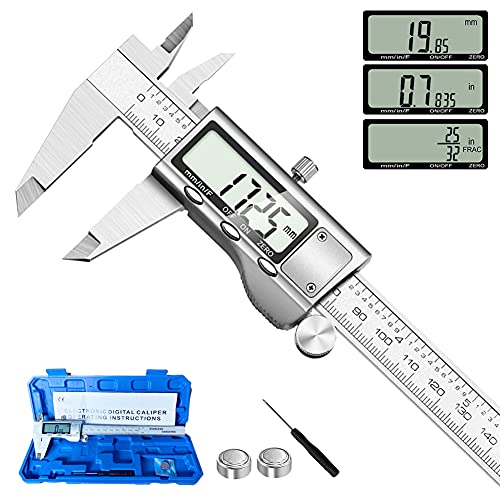
Digital Caliper Measuring Tool, Stainless Steel Vernier Caliper Digital Micrometer with Large LCD Screen, Easy Switch from Inch Metric Fraction, 6 Inch Caliper Tool for DIY/Household
- Material: Stainless steel, waterproof and durable
- Measurement Range: 0-6 inches / 0-150mm
- Accuracy: ±0.001 inch / 0.02mm
As an affiliate, we earn on qualifying purchases.
As an affiliate, we earn on qualifying purchases.
Frequently Asked Questions
What Tools Are Best for Manual Scaling of Drawings?
For manual scaling of drawings, you should use a scale ruler, which is essential for precise measurement techniques. It allows you to easily convert scaled dimensions to real-world sizes by matching the scaling standards used in your plans. Additionally, a straightedge or a grid can help guarantee accuracy. Always double-check your measurements to maintain consistency and accuracy, especially when working with different scaling standards in your drawings.
How Do I Handle Scaling Irregular or Complex Shapes?
Did you know that complex shapes can be scaled accurately with the right techniques? When handling irregular or complex shapes, you should break them into simpler sections, then apply scaling techniques to each part separately. Use measurement accuracy tools like flexible rulers and digital calipers to guarantee precision. Carefully measure key points, and double-check your calculations. This approach helps maintain accuracy and ensures your scaled drawing reflects the true dimensions.
Can Digital Tools Automatically Scale Drawings Accurately?
Yes, digital tools can automatically scale drawings accurately, thanks to digital calibration features. When you use software with high accuracy, it ensures your scaling process is precise, reducing errors. Make certain to select the correct scale and calibration points within the software. This way, you can confidently convert plans to real dimensions, trusting that the software’s accuracy will handle complex shapes or irregular designs effectively.
What Errors Should I Watch for During Scaling?
You should watch out for measurement accuracy errors that can occur during scaling, especially if you use scaling shortcuts that seem quick but aren’t precise. Double-check your measurements regularly and verify scaling factors to avoid inaccuracies. Be cautious of misaligned or distorted drawings, which can lead to incorrect dimensions. Always cross-reference scaled measurements with original plans to guarantee precision, preventing costly mistakes in your project.
How Do I Convert Scales Between Different Units?
Oh, because everyone loves math puzzles, right? To convert scales between different units, you simply perform a scale conversion by multiplying or dividing by the conversion factor. For example, if your plan’s scale is 1 inch equals 10 feet, and you need to switch to centimeters, find the conversion factor between feet and centimeters, then apply it. Always double-check your unit measurement to avoid hilarious mistakes!
Conclusion
Now that you know how to scale drawings, you’re like a master mapmaker bringing tiny plans to life. Remember, a scale is your magic wand, transforming paper into real-world dimensions. With this skill, you can confidently turn dreams into tangible structures, guiding your project like a compass. Keep practicing, and soon, you’ll navigate the world of design with the ease of a seasoned sailor charting new waters.